Guide · September 8, 2026
How to automate Instagram DM responses
A practical guide to automating Instagram DM responses with native tools, chatbot platforms and escalation rules, without sounding robotic.
 By Jaime · Co-founder of Quetzal

Automating Instagram DM responses means stacking three layers: Instagram's own quick replies and automated responses inside Meta Business Suite, a dedicated chatbot platform such as ManyChat or Chatfuel for anything beyond a canned FAQ, and a clear rule for when a real person takes over.
Most businesses can set up the first layer in under fifteen minutes and only need the second once DM volume actually justifies it. Neither layer requires code.
While inbox tools manage incoming replies, direct messages depend on consistent posting. Quetzal does the work instead of organising it by creating posts, carousels and reels in your brand's visual identity. You can try it free on your own website in about 3 minutes.
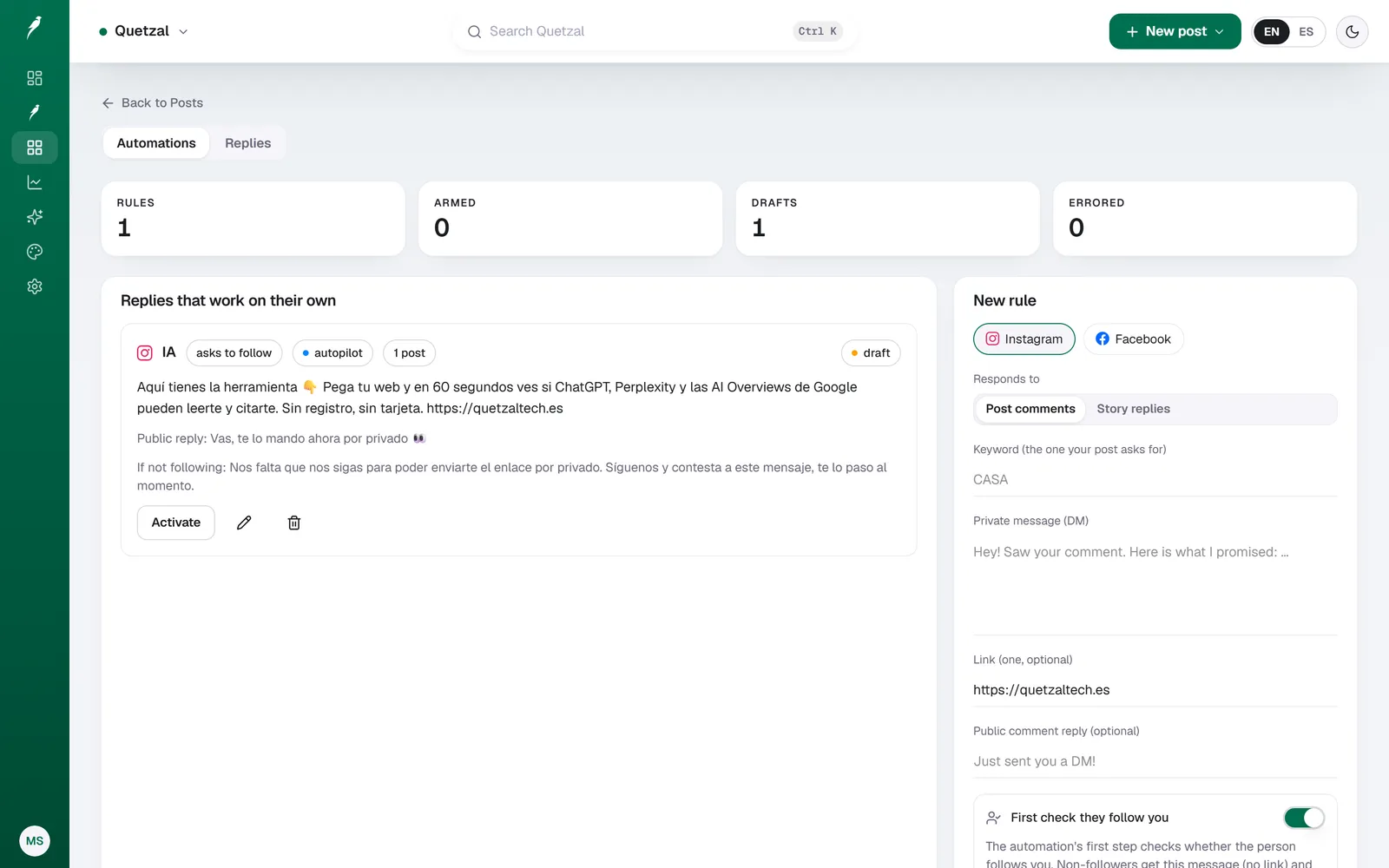
A comment-to-DM rule in Quetzal: when someone comments the keyword on an Instagram post, they get the link by private message, and people who do not follow the account are asked to follow first.
What counts as an automated Instagram DM response
Instagram DM automation runs on triggers, not magic. A message comes in, it matches a condition, and a pre-written or dynamically generated reply goes out. The common triggers are:
- First message from a new contact (the classic "welcome" or away message)
- Keyword match ("price", "shipping", "size" trigger a specific saved reply)
- Story reply or mention (someone reacts to a story and gets an automatic follow-up)
- Comment-to-DM (a public comment on a post triggers a private message, common for giveaways)
- After-hours fallback (a message sent outside business hours until a human replies)
Everything past that, branching menus, order lookups, appointment booking inside the chat, needs a chatbot platform connected through the Instagram Graph API rather than Instagram's built-in tools.
How to turn on Instagram's native automated replies
Instagram's own automation lives inside Meta Business Suite, not the Instagram app itself, and it is free for any Business or Creator account.
- Open Meta Business Suite and go to Inbox > Automated responses.
- Turn on Instant reply to send a first message the moment someone DMs you for the first time.
- Set up Away messages tied to your business hours.
- Create Saved replies for the questions you answer most (returns policy, store hours, sizing) and trigger them with keywords.
- Use Frequently asked questions to surface three or four buttons a user can tap instead of typing.
This covers the 80% of DMs that are repetitive and low-stakes. It will not handle order status lookups, multi-step qualification, or anything that needs to read data from outside Instagram. It's also strictly reactive: it cannot proactively message someone based on what they liked or bought.
When native tools aren't enough
Once DM volume includes real qualification (lead capture, product recommendations, booking flows, order tracking), you need a platform that connects through the Instagram Graph API and builds actual decision trees.
The names that show up most often for this specific job are ManyChat, Chatfuel and, for teams already inside a broader inbox tool, Sprout Social or Respond.io. These platforms let you:
- Build multi-step flows with buttons and conditional branches
- Pull variables (name, last order, tag) into the reply text
- Hand off to a human agent automatically when a flow can't resolve the request
- Run comment-to-DM funnels for launches and giveaways at scale
They are a different category of tool from a content or posting platform. None of them design posts, schedule content or manage your feed, they exist purely for the inbox and the comment section.
Native replies vs a chatbot platform vs staying manual
| Instagram native (Meta Business Suite) | Chatbot platform (ManyChat, Chatfuel) | Manual replies | |
|---|---|---|---|
| Cost | Free | Free tier, paid plans for volume | Free (in staff time) |
| Setup time | Under 30 minutes | Half a day to build a real flow | None |
| Handles keywords / FAQ | Yes | Yes | N/A |
| Multi-step logic, CRM data | No | Yes | Yes, but slow |
| Comment-to-DM funnels | No | Yes | No |
| Feels personal at scale | Moderate | High if built well | High but doesn't scale |
| Best for | Low-to-medium DM volume, simple questions | Launches, lead qualification, high volume | Very small accounts, sensitive conversations |
For most small and mid-sized accounts, native automated replies plus a handful of saved replies cover daily operations. A chatbot platform earns its cost only once DMs are a real sales or support channel with recurring, predictable questions.
How to keep automated DMs from sounding robotic
The failure mode with DM automation isn't technical, it's tone. A reply that's technically correct but written in generic customer-service English immediately reads as automated in a way that damages trust. Three fixes that actually matter:
- Write replies in the account's real voice, not a neutral customer-service register. If the brand is casual on posts and stiff in DMs, the mismatch is obvious.
- Cap automation at one or two exchanges before offering a human handoff. Nobody wants to negotiate with a bot past the second message.
- Update saved replies when the business changes (new pricing, new hours, a sold-out product). Stale automated replies are worse than no automation at all, because they actively give wrong information.
That last point is the real cost of DM automation: it needs the same maintenance as any other piece of customer-facing content. It's written once and then forgotten by most teams, which is exactly when it starts contradicting what's on the profile.
Where automated DMs meet the content that generates them
DM volume follows content, not the other way around: an engaging post generates the questions and leads your automated replies handle, while an inconsistent feed sparks confusion. Quetzal supports the content side of this workflow with three concrete benefits.
First, it does the work instead of organising it: rather than just scheduling files you made yourself, it generates designed posts, carousels, stories, captions and AI video reels, which you can see on the product page.
Second, the content looks like the business instead of a template by using your own logo, palette, fonts and product photos across every post. Third, it gets better every week because it measures every post at 1, 6, 24 and 72 hours to plan future output from what performed best.
You can run it on full autopilot or approve each post individually, with plans starting at 79 EUR or 89 USD a month on the pricing page with a 7-day free trial.
To see a full week of branded content generated for your website in about 3 minutes without signing up, visit /demo.
FAQ
Can you automate Instagram DMs for free?
Yes. Meta Business Suite's Instant Reply, Away Message, Saved Replies and FAQ menus are free on any Instagram Business or Creator account and cover most repetitive questions without any third-party tool.
Free tiers of ManyChat and Chatfuel also exist but cap message volume, so cost usually only enters the picture once DM traffic is high enough to need multi-step flows.
Does automating Instagram DMs violate Instagram's rules?
No, as long as the automation uses Instagram's official Graph API or the native Meta Business Suite tools. What violates policy is spam-style automation: mass unsolicited DMs to accounts that haven't messaged first, or bots that impersonate a human in a way designed to deceive.
Reactive automated replies to inbound messages are explicitly supported by Meta's own tools.
What's the difference between DM automation and a social media automation tool like Quetzal?
DM automation handles one-to-one conversations in the inbox: replies, keyword triggers, lead capture. Content automation tools like Quetzal handle the public-facing side: generating on-brand posts, captions, carousels and video reels, then scheduling and publishing them across platforms and measuring performance. They solve different problems and typically run alongside each other rather than replacing one another.
Really made with Quetzal
Real product output, untouched. What you see is what it generates.