Guide · September 12, 2026
How to Use AI to Schedule Social Media Posts
Learn how to use AI to schedule social media posts, from predictive timing and automated asset generation to closed-loop analytics across all platforms.
 By Sergio · Co-founder of Quetzal

To use AI to schedule social media posts, connect your profiles to an AI scheduling platform, establish your brand guidelines and asset parameters, and enable predictive delivery windows. Modern AI schedulers generate channel-tailored creatives, select optimal publication times based on live audience activity, and autonomously publish or queue posts for single-click team approval.
Quetzal handles this process by doing the work instead of just organizing it, generating designed posts, carousels, stories, captions, and video reels and publishing them across six networks. Brands can run scheduling on full autopilot or approve each post beforehand, and anyone can try it free on your own website to see it in action.
Social media scheduling has moved well beyond static calendar grids and pre-set queue slots. Teams no longer spend hours writing batches of captions, resizing images in external design tools, and guessing whether Tuesday at 10:00 AM is still effective.
In 2026, artificial intelligence handles the entire pipeline: generating native visual assets, drafting platform-specific copy, selecting hyper-targeted delivery windows, and adjusting future schedules based on post-performance data.
Here is how to set up, operate, and scale an AI-driven social media scheduling workflow.
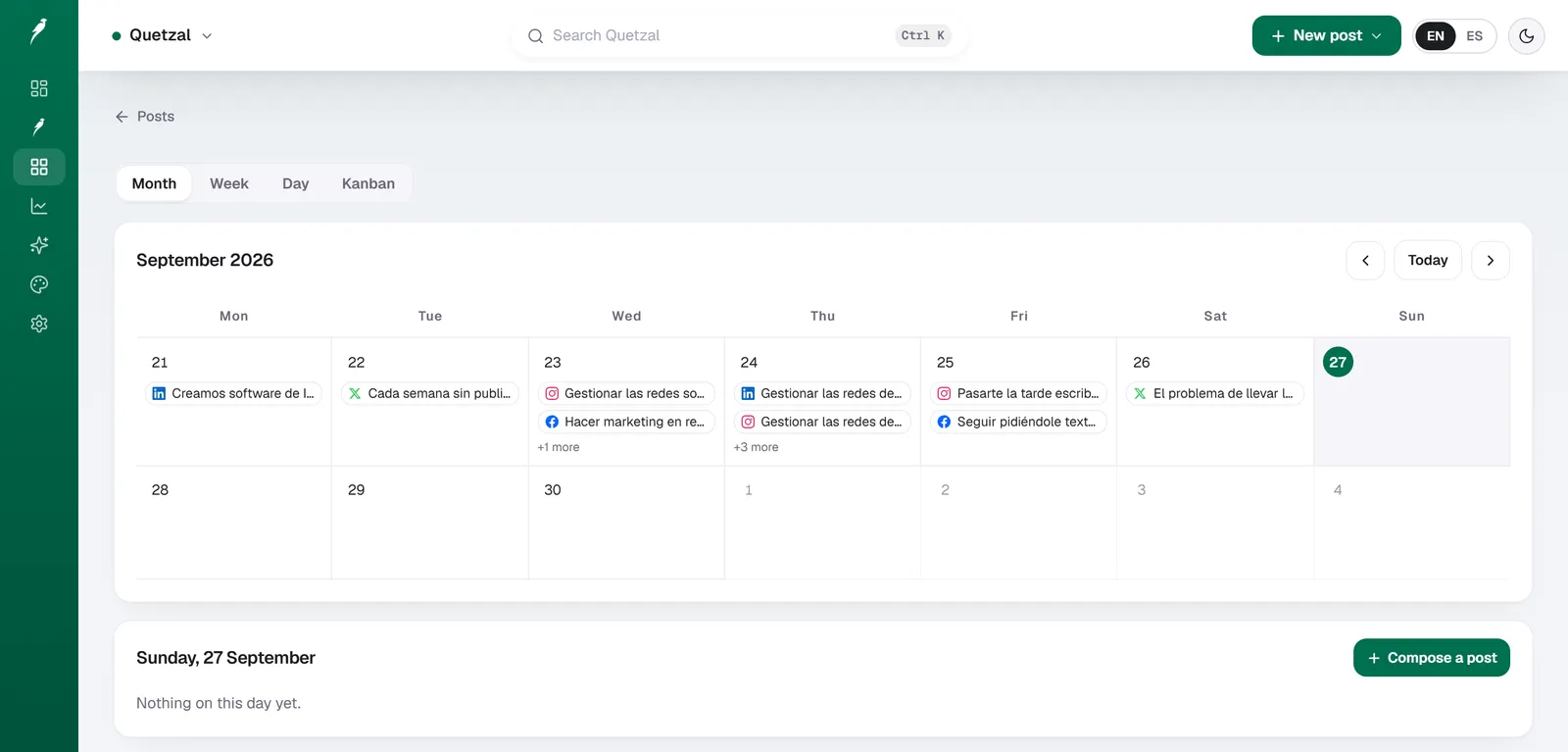
The Quetzal calendar on our own account in September 2026: every post the autopilot planned for LinkedIn, X, Instagram and Facebook, and underneath, the posts still waiting for approval. Our account publishes in Spanish.
Understand the three tiers of AI social media scheduling
Before selecting software or building a workflow, you must understand how different tools categorize AI scheduling. The market contains three distinct operational models:
- AI-assisted manual schedulers: Traditional social schedulers that integrate an AI text box. You manually create a time slot, prompt a large language model to write a caption, manually attach an image you made elsewhere, and set the date.
- Predictive timing schedulers: Platforms that focus on the dispatch layer. These tools ingest audience engagement patterns and adjust pre-written queues to publish when your specific followers are most active.
- End-to-end AI autopilots: Systems that unify creative generation, multi-network adaptation, algorithmic scheduling, and automated publishing into a continuous loop.
As outlined by Sprout Social's breakdown of AI in social media, the most effective teams apply machine intelligence across creative, distribution, and analytical tasks rather than treating AI as an isolated copywriting assistant.
| Capability | Traditional Scheduling (e.g., Buffer, Hootsuite) | AI-Assisted Scheduling | Full AI Autopilot (e.g., Quetzal) |
|---|---|---|---|
| Source: Hootsuite, 2026 | |||
| Content Creation | Fully manual | Text generation inside manual composer | Generates branded graphics, carousels, video reels, and text |
| Timing Selection | Static queues or historical averages | Best-time-to-post recommendations | Continuous predictive audience optimization |
| Asset Adaptation | Manual cropping and multi-post editing | Basic text rewriting per network | Native layout, aspect ratio, and asset rendering per channel |
| Post-Publish Analysis | Passive metric dashboards | Basic metric aggregation | Closed-loop iteration (adjusts future queues automatically) |
| Operational Overhead | 5 to 10 hours per week | 2 to 4 hours per week | 15 to 30 minutes per week (approval mode) or zero |
Step 1: Establish your brand identity and data guardrails
An automated scheduling system is only as reliable as the boundaries you configure. AI generation models produce bland, generic content when left unguided. To make AI scheduling work without damaging brand equity, feed the platform concrete brand guidelines before queuing a single post.
Your setup must include:
- Visual identity parameters: Upload exact hex codes, primary and secondary typography, logo files (both horizontal and square marks), and image background rules.
- Asset libraries: Provide high-resolution product photography, lifestyle imagery, and team assets. Modern AI engines use these raw files to generate contextual product posts, carousels, and stories rather than relying solely on synthetic stock graphics.
- Editorial tone and voice rules: Define your brand voice with explicit positive and negative constraints. For example: "Authoritative, practical, and conversational. Do not use generic rhetorical questions, excessive emojis, or buzzwords like 'game-changer' and 'unlock'."
- Compliance rules: Specify regulatory disclosures, required hashtags, or banned terminology, especially if operating in legal, financial, or medical fields.
If you want to evaluate how coherent your visual presence looks before feeding assets to an automation engine, you can run a quick audit using the free brand consistency check tool.
Step 2: Configure multi-format asset generation
Scheduling in 2026 requires multi-format asset coordination. A single text prompt cannot simply be mirrored across networks; each network rewards specific media types and technical structures:
- LinkedIn: Prioritizes multi-slide PDF carousels, text-only industry teardowns, and visual data infographics.
- Instagram: Demands high-resolution 4:5 static graphics, 9:16 vertical video reels, and multi-image carousels.
- TikTok & YouTube Shorts: Require vertical 9:16 video renders with dynamic voiceovers, background audio, and word-synced subtitles.
- X (formerly Twitter): Requires concise hooks, visual link previews, and rapid-response short updates.
- Facebook: Balances community-oriented long-form updates, image galleries, and vertical video.
Advanced tools handle this automatically. For instance, Quetzal builds designed static posts, carousels, infographics, stories, and end-to-end video reels (complete with AI voiceover, script, and word-synced captions) directly in the brand's visual identity, formatting each asset natively for Instagram, Facebook, LinkedIn, TikTok, X, and YouTube.
When setting up your AI scheduler, establish generation templates for each channel so you are not manually reformatting graphics or video dimensions inside external design apps.
Step 3: Implement predictive scheduling over static time slots
The traditional method of social scheduling involved populating a rigid grid: every Monday at 9:00 AM, Wednesday at 1:00 PM, and Friday at 4:00 PM. This system fails because social network algorithms do not distribute content evenly, and follower activity fluctuates based on regional holidays, news cycles, and platform shifts.
Modern AI schedulers use predictive timing models. As documented in Hootsuite's guide to AI in social media, AI models analyze historical engagement rates, follower active windows, and platform-wide network traffic to predict the exact half-hour window when a post has the highest probability of gaining initial velocity.
When configuring your AI scheduling tool:
- Set platform-specific frequency caps: Do not publish at the same cadence across all channels. Set guardrails such as 1 to 2 times daily on LinkedIn, 1 time daily on Instagram, and 2 to 3 times daily on X.
- Define quiet hours: Instruct the scheduling agent to avoid publishing during non-operational periods if your team lacks customer support coverage to answer immediate comments.
- Allow dynamic queue shifting: Give the AI permission to shift an asset forward or backward by several hours if sudden platform volatility or competing breaking news makes your planned slot inefficient.
If you are mapping your distribution strategy from scratch, generating an exportable schedule with a free content calendar generator will help you establish realistic posting frequencies per channel before switching on autonomous scheduling.
Step 4: Choose between full autopilot and human-in-the-loop workflows
AI scheduling does not require you to surrender editorial control. In practice, mature marketing teams deploy one of two operational governance models:
The approval workflow (human-in-the-loop)
Under this model, the AI schedules and designs an entire week of posts in advance, holding them in a staging area. A social media manager or agency account director logs in once a week, reviews the suggested pipeline, adjusts any copy or visual assets with a single click, and hits approve.
This workflow eliminates 90% of production time while keeping a human gatekeeper between the generation engine and the public feed. For marketing agencies managing multiple brands, this approach provides the scale of automation with zero risk of client misalignment.
You can learn more about managing client-specific workspaces and portfolio setups on Quetzal's agency solutions page.
The autonomous autopilot
Under this model, the AI engine operates as a fully autonomous agent. It evaluates the brand's content calendar, selects themes based on target pillars, generates all corresponding visual and video assets, writes native captions, and publishes directly to the connected social APIs at optimal times.
Autopilot is particularly effective for founder-led startups, local service companies, and lean marketing departments that lack the bandwidth to manage daily social queues. It guarantees an active, professional presence across all six major networks without requiring daily intervention.
Step 5: Close the feedback loop with automated post-measurement
Scheduling a post is not the final step of social media distribution. The fundamental advantage of using artificial intelligence over a conventional scheduler is the ability to build a continuous learning loop.
Traditional schedulers treat post distribution as a one-way street: you schedule a post, it publishes, and the scheduler stores the raw metrics on a dashboard. The human operator must manually study those numbers, deduce patterns, and decide what to write next week.
An AI social media autopilot monitors every published asset across distinct measurement intervals:
- Hour 1: Evaluates immediate velocity, initial hook performance, and platform delivery tier.
- Hour 6: Measures early comment depth, shares, and algorithmic expansion beyond core followers.
- Hour 24: Assesses overall distribution stability and click-through rates.
- Hour 72: Records trailing engagement and saves performance signals to the model memory.
These measurements inform the scheduler's next generation cycle. If carousel posts breaking down step-by-step case studies produce three times more LinkedIn saves than single-image tips, the AI adjusts the upcoming schedule to favor carousels.
If technical deep dives on X generate high impressions but low profile clicks, the system refines the hook structure for the following week's schedule.
How to connect social platform APIs to an AI scheduler
Connecting your social profiles to an AI scheduler takes less than ten minutes. The technical authorization follows a standardized OAuth protocol across major networks. Here are the precise steps:
- Instagram and Facebook: Ensure your Instagram profile is converted to a Professional or Creator account and connected to an official Facebook Business Page. The scheduler connects through Meta's Graph API, which requires administrative access to the underlying Meta Business Suite.
- LinkedIn: Connect using an account that possesses Super Admin or Content Admin rights to your LinkedIn Company Page. Personal profiles can also be authorized for executive personal branding.
- TikTok: Authorize the scheduler via the TikTok for Business or Creator API to allow automatic vertical video uploads without requiring manual mobile push notifications.
- YouTube: Connect your Google Account and select the relevant YouTube Brand Channel, enabling permissions for video uploads and metadata publishing for Shorts.
- X (Twitter): Authenticate your account via OAuth 2.0 to grant write permissions for text, threads, and media uploads.
Once authenticated, verify that the AI scheduler possesses direct-publishing permissions rather than mobile reminder notifications. In 2026, all major networks permit direct programmatic publishing for static images, carousels, and vertical video renders through verified third-party API developer partners.
Avoid these common AI scheduling pitfalls
While AI automates distribution, blind automation leads to measurable drops in engagement. Watch out for these four operational errors:
Publishing identical copy across all channels
Each social network maintains distinct cultural norms, readability preferences, and character limits. Blasting the same 200-word update with five hashtags across LinkedIn, X, and Instagram signals low-effort syndication to both users and recommendation algorithms.
Ensure your AI scheduler rewrites hooks, alters character counts, and formats line breaks to match the destination channel natively.
Neglecting conversation and community management
AI can schedule and publish your content, but social algorithms heavily weight downstream engagement: replying to comments, joining relevant industry discussions, and answering direct messages. If an AI scheduler publishes an insightful breakdown that attracts twenty comments, an absent brand presence wastes that algorithmic reach. Pair automated scheduling with active community monitoring.
Running static prompt chains without brand context
Relying on generic external prompts like "write five social media tips about dental health" produces generic lists that provide no unique value to your audience. Instead, connect your scheduler to an engine that can extract context directly from your website, recent service updates, or case studies.
Ignoring real-time news and market context
An automated queue that publishes cheerful promotional content during a global crisis or industry incident damages reputation. Ensure your scheduling software features a global pause button that immediately freezes all planned queues across every network with a single click.
See how AI schedules a full week of content for your business
Quetzal eliminates manual scheduling overhead by doing the work instead of organizing it, creating designed posts, carousels, stories, captions, and video reels and publishing them across six networks. Every post reflects the brand's own visual identity with its logo, palette, fonts, and product photos rather than standard templates.
The scheduling engine also improves every week because every post is measured at 1, 6, 24, and 72 hours to plan subsequent queues from top-performing content. You can see a real week of branded content generated for your business in about 3 minutes with no signup at /demo.
FAQ
Does scheduling social media posts with AI hurt organic reach?
No, using an AI scheduler does not penalize your content. Social platforms evaluate reach based on content engagement, retention, and format relevance rather than whether the post was submitted through their mobile app or an approved API partner. In fact, AI schedulers often improve reach by consistently publishing during precise peak audience activity windows.
What is the difference between an AI copy generator and an AI scheduler?
An AI copy generator (like ChatGPT or Claude) merely produces text based on a manual prompt, leaving you to copy, design graphics, format, and schedule the post by hand. An AI scheduler integrates content generation, native visual design, predictive timing, direct API publishing, and performance tracking into an automated system.
Can AI schedule video content like Instagram Reels and TikToks automatically?
Yes. Modern platforms can write scripts, generate AI voiceovers, edit footage, render dynamic subtitles, and publish the finished vertical 9:16 video directly to TikTok, Instagram Reels, and YouTube Shorts via official developer APIs without requiring manual phone notifications.
How much does AI social media scheduling software cost in 2026?
Basic AI-assisted schedulers typically cost between $15 and $50 per month, though they require manual design work and post assembly. End-to-end autopilots that handle visual design, video generation, and autonomous scheduling range from $89 to $499 per month depending on posting volume, workspace seats, and brand accounts.
Sources
- Sprout Social: 10 ways to use AI in social media https://sproutsocial.com/insights/ai-in-social-media/
- Hootsuite: 11 ways to use AI in social media https://blog.hootsuite.com/how-to-use-ai-for-social-media/
Really made with Quetzal
Real product output, untouched. What you see is what it generates.