Guide · September 8, 2026
How to create a social media calendar (2026 guide)
Learn how to create a social media calendar step by step, what to include, how far ahead to plan, and which tools actually save time in 2026.
 By Sergio · Co-founder of Quetzal

A social media calendar is a planned schedule of what you post, where, and when, built around themes, formats and dates that matter to your business.
To create one, you list your platforms, set a realistic posting frequency, map content types to a recurring structure (weekly or monthly), fill it with drafts tied to real dates, and review performance to adjust the next cycle. The rest of this guide walks through each step.
Quetzal handles this process by doing the creative and production work instead of just organising empty slots, generating designed posts, carousels, captions and video reels in your brand's visual identity before publishing them across six platforms.
It also tracks each post at 1, 6, 24 and 72 hours so the next week's calendar is planned directly from what worked. You can try it free on your own website to see a week of scheduled content generated in about 3 minutes without signing up.
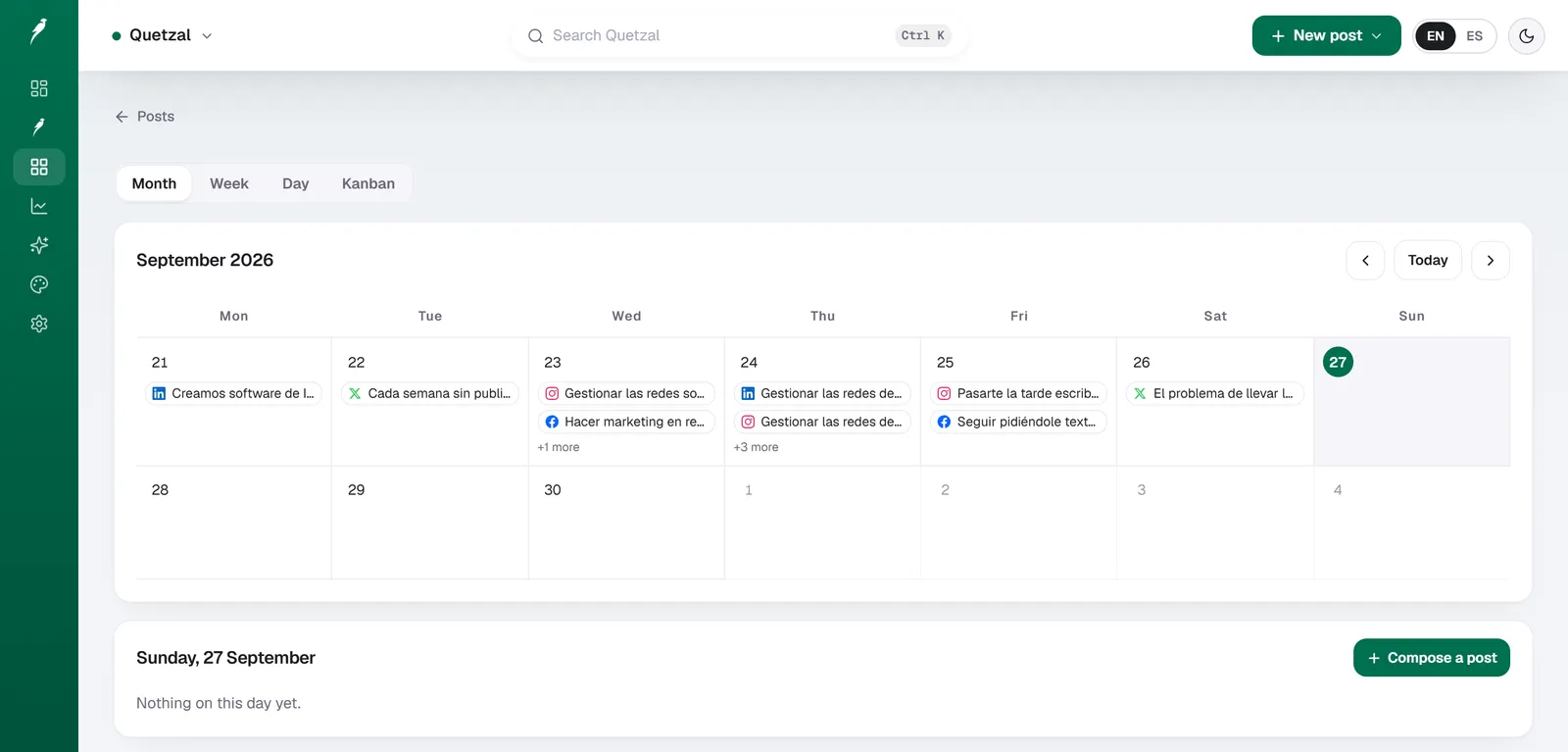
The Quetzal calendar on our own account in September 2026: every post the autopilot planned for LinkedIn, X, Instagram and Facebook, and underneath, the posts still waiting for approval. Our account publishes in Spanish.
What a social media calendar actually includes
A working calendar is more than a list of dates. Five elements need to be in it, whatever tool or spreadsheet you use:
- Platform: Instagram, LinkedIn, TikTok, Facebook, X, YouTube each have different formats and audience expectations, so a calendar entry should specify which one, not just "social media."
- Format: static image, carousel, short video, story, infographic. The format decides how much production time you need.
- Copy and caption: the actual text, including hashtags and a call to action, drafted in advance rather than written the morning of.
- Visual asset: the image or video file, or a clear note on who is producing it and by when.
- Publish date and time: tied to your audience's active hours on that specific platform, not a generic "9am" slot copied across all six.
If any of these five is missing, the calendar becomes a wish list rather than a working document, and posting slips.
How to create a social media calendar step by step
Audit what you're already posting: pull the last 30 to 60 days of posts across your platforms. Note which formats and topics got the most engagement. This tells you what to repeat and what to drop, rather than guessing.
Set a posting frequency per platform: pick a frequency you can sustain for a full quarter without burning out your team, then hold it steady long enough to see if it works. Instagram and TikTok reward more frequent posting than LinkedIn or X for most B2C brands, but there's no universal number that fits every business.
Build a content pillar structure: group your posts into 3 to 5 recurring themes (for example: product features, customer proof, behind the scenes, education, promotions). Assign pillars to days of the week or slots in the month so you're never staring at a blank calendar wondering what to post.
Map key dates first: product launches, sales, industry events, holidays relevant to your audience. Drop these into the calendar before anything else, since they anchor the rest of the schedule.
Fill in the gaps with pillar content: once fixed dates are placed, fill the remaining slots using your content pillars, rotating formats so you're not posting six carousels in a row.
Draft captions and briefs in batches: writing five captions in one sitting is faster than writing one a day, and it keeps tone consistent. Do the same for visual briefs if you're not designing everything yourself.
Schedule the posts: whether that's a native scheduler, a spreadsheet plus manual posting, or a tool that publishes automatically, this is the step where the calendar becomes real output instead of a plan.
Review and adjust weekly: check what performed in the last cycle before planning the next one. A calendar that never gets revised based on results is just a template, not a strategy.
How far ahead should you plan: weekly or monthly?
Both have a place, and most businesses need a version of each.
A monthly calendar is your strategic layer: content pillars, key dates, campaign themes, and roughly how many posts per platform. It gives you and anyone else on the team a picture of the month at a glance, and it's what you'd share with a manager or client for approval.
A weekly calendar is the working layer: exact captions, exact assets, exact publish times. This is what actually gets executed day to day, and it should be flexible enough to swap in a timely post (a trending topic, a news reaction) without breaking the monthly structure underneath it.
If you're building your first calendar, start monthly to set the shape, then break each month into weekly execution sheets.
Tools built for this, like the free content calendar generator, can produce a month's worth of branded structure from your website in one pass, which is a faster starting point than a blank grid.
Which tools to use to build and run the calendar
You can run a calendar in a spreadsheet, a native scheduler like Meta Business Suite, or a dedicated social media tool. The difference between them is mostly how much of the production work (design, captions, video) they do for you versus leaving it to you.
| Tool | Generates the actual content | AI video reels | Platforms covered | Entry price |
|---|---|---|---|---|
| Quetzal | Yes, in your brand identity | Yes, script to finished render | Instagram, Facebook, LinkedIn, TikTok, X, YouTube | 79 EUR/mo (Starter) |
| Buffer | No, scheduling only | No | Most major platforms | Free / paid tiers |
| Hootsuite | No, scheduling only | No | Most major platforms | Paid tiers |
| Later | No, scheduling and light design | No | Instagram-focused, others supported | Paid tiers |
| Metricool | No, scheduling and analytics | No | Most major platforms | Paid tiers |
| Publer | No, scheduling only | No | Most major platforms | Paid tiers |
| Ocoya | Some AI captions | Limited | Most major platforms | Paid tiers |
| Predis.ai | Some AI post generation | Limited | Most major platforms | Paid tiers |
A spreadsheet or a scheduler solves the "when do I post" problem but not the "who designs and writes this every week" problem, which is usually the part that actually breaks a calendar after a few months.
Quetzal was built in Málaga by two founders specifically to close that gap: it generates the designed post, ad, carousel, infographic, story or video itself, in the brand's own logo, colors, fonts and product photos, and then schedules and publishes it to the calendar automatically.
Full detail on how the generation, scheduling and publishing pipeline works is on the product page.
How to keep the calendar consistent with your brand
A calendar full of good ideas still fails if every post looks like it came from a different company. Three checks keep it consistent:
- Lock the visual system before you fill the calendar: logo placement, color palette, font, and photo style should be decided once and applied to every asset, not reinvented per post. If you're not sure how consistent your current profiles actually look, the free brand check tool audits that across your existing accounts.
- Write a one-page tone guide: two or three sentences on voice (formal, playful, technical) prevents captions drifting week to week, especially if more than one person writes them.
- Review the calendar as a grid, not post by post: look at how a week of content sits together visually on the Instagram or LinkedIn grid before publishing, not after.
Quetzal's autopilot can run under standing brand guidelines you set once, publishing without per-post approval, or it can hold every post for your sign-off first.
Which mode you use is a choice, not a fixed setting, so agencies and in-house teams can pick the level of control they need per client or per campaign.
Agencies managing several client calendars from one place can see how that works on the agencies page.
See your calendar built for your own business
Instead of spending hours planning, designing and scheduling by hand, Quetzal runs your social media calendar from draft to publication:
- It does the work instead of just organising it, generating static posts, carousels, captions and video reels rather than leaving empty slots to fill.
- Every post is created in your brand's own visual identity using your logo, palette, fonts and product photos.
- It measures every post at 1, 6, 24 and 72 hours so the next week's calendar is automatically planned from what worked.
Anyone can see how this works on their own website in about 3 minutes with no signup at the Quetzal demo.
FAQ
How many posts per week should a social media calendar include?
There's no fixed number that works for every business. Most active B2C brands post 3 to 7 times a week on Instagram and TikTok combined, while B2B brands on LinkedIn often post 2 to 4 times a week.
The right number is whatever you can sustain at consistent quality for a full quarter without gaps, since irregular posting hurts more than a lower steady frequency.
What's the difference between a content calendar and a social media calendar?
A content calendar usually covers all content types a business produces, including blog posts, emails and videos, while a social media calendar is scoped specifically to platform posts, captions and publish times. In practice many teams use the terms interchangeably and run one combined calendar, splitting it out only once volume across channels grows large enough to need separate tracking.
Can I create a social media calendar for free?
Yes. A spreadsheet with the five elements covered above (platform, format, copy, asset, date) costs nothing and works fine for low volume.
For a faster starting structure, the free content calendar tool generates a month of branded calendar content from your website and exports to Excel, Sheets or Notion, and Quetzal's pricing page covers what a fully automated calendar costs once you're ready to move past manual planning, including the 7-day free trial.