Guide · September 5, 2026
How to automate social media replies (2026 guide)
A practical guide to how to automate social media replies: native tools, inbox software, AI drafting, and where automation should stop.
 By Jaime · Co-founder of Quetzal

Automating social media replies means setting up rules, saved responses, or AI-drafted suggestions so comments and direct messages get answered without you typing each one by hand.
Most brands layer platform-native tools with a dedicated social inbox and AI drafting, keeping a human in the loop for anything beyond FAQs, hours, and order status. Full autonomy is technically possible on every major platform, but it should be scoped narrowly.
While social inboxes handle incoming messages, maintaining the publishing schedule that sparks those conversations requires equal effort. Quetzal handles that workload by designing and publishing static posts, carousels, and video reels across six platforms in your brand's own visual identity.
You can keep complete control with per-post approval or run on full autopilot, and you can try it free on your own website to see how it frees up time for customer replies.
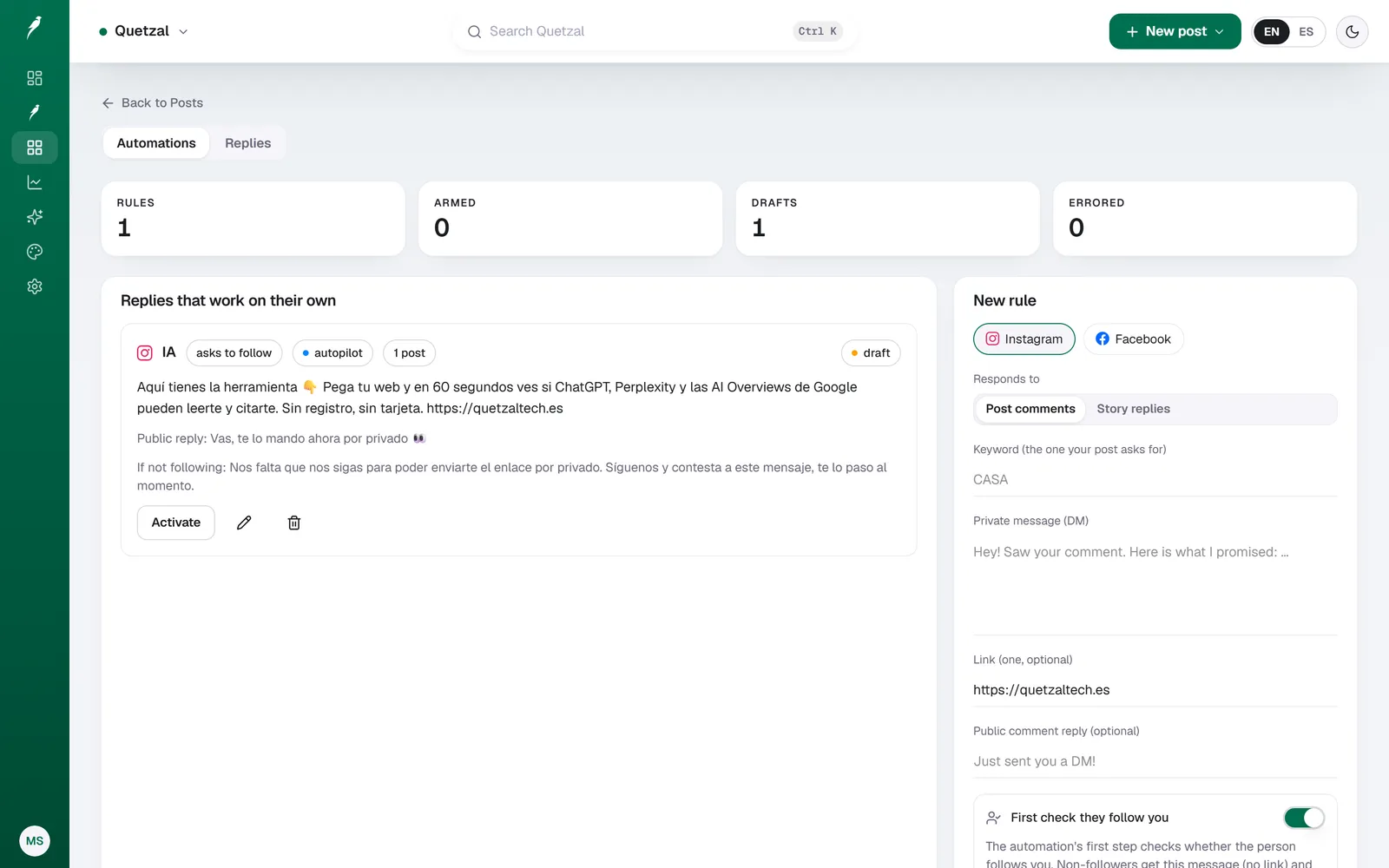
A comment-to-DM rule in Quetzal: when someone comments the keyword on an Instagram post, they get the link by private message, and people who do not follow the account are asked to follow first.
What does "automating social media replies" actually cover?
Reply automation isn't one feature, it's a stack of four layers that most teams mix and match:
- Instant triggers: a keyword or emoji in a comment fires an automatic acknowledgment ("Thanks, we'll DM you the link").
- Saved or canned replies: pre-written answers to repeat questions (shipping times, pricing, store hours) that a person or a rule inserts with one click.
- AI-drafted replies: a language model reads the comment or DM and writes a tone-matched response that a human approves or edits before sending.
- Fully autonomous bots: rules or AI that send replies with no human review, usually reserved for narrow, low-risk intents.
Almost every brand that says it "automates replies" is really using layer 1 or 2 for volume and layer 3 for anything that needs judgment. Layer 4 is where mistakes become screenshots, so it's used sparingly.
How do you automate replies natively on each platform?
Each network has its own limits before you need a third-party tool.
- Instagram and Facebook: Meta Business Suite lets you set automated Instant Replies to DMs, saved replies for comments, and keyword-triggered auto-responses in Messenger. This covers the basics for free but the rule builder is limited to simple keyword matching.
- TikTok: creators can set auto-replies to comments containing specific words, mainly used for "link in bio" style prompts. There's no native DM automation for most business accounts yet.
- X (Twitter): no native reply automation exists. Anything beyond manual replies requires a third-party tool connected via the API, and API access tiers affect what's possible.
- LinkedIn: no native auto-reply feature for comments or messages. Automation here almost always means a browser extension or a third-party inbox tool, which sits closer to LinkedIn's terms of service grey zone than Meta's official tools.
- YouTube: YouTube Studio supports held-for-review filters, blocked words, and pinned canned responses, but not true auto-reply based on comment content.
If your volume is low and you're mostly answering the same five questions, native tools plus a shared doc of canned answers will get you most of the way without paying for software.
How do dedicated inbox tools automate replies?
Once comment and DM volume grows across several accounts, a unified social inbox becomes worth paying for. These tools pull every comment and message into one dashboard, apply rules, and let AI draft responses in the brand's voice.
| Tool | Unified inbox | Saved replies | Rule-based auto-reply | AI reply drafting |
|---|---|---|---|---|
| Buffer | Basic engagement inbox on paid plans | Yes | Limited | Limited |
| Hootsuite | Full inbox across connected accounts | Yes | Yes | Yes on higher tiers |
| Later | Inbox on select plans | Yes | Limited | Limited |
| Metricool | Inbox for comments and DMs | Yes | Yes | Yes |
| Publer | Inbox for comments and DMs | Yes | Limited | Limited |
| Ocoya | Inbox on some plans | Yes | Limited | Yes, tied to content generation |
| Predis.ai | Not a core focus | No | No | Primarily content, not replies |
Feature depth changes often and varies by plan tier, so check the current plan pages before buying based on this table alone. As a rule of thumb: the more a tool is built around content creation and scheduling, the less mature its reply automation tends to be, and vice versa.
When should AI draft or send replies automatically?
This is the actual decision that matters more than which tool you pick.
Safe to fully automate:
- Business hours, location, and holiday closures
- Order status and shipping timelines fed from a known data source
- Repeated FAQ (return policy, sizing chart, pricing tiers)
- Spam and abusive comment filtering
Draft with AI, but require human approval:
- Complaints or negative reviews
- Anything touching pricing exceptions, refunds, or legal terms
- Health, medical, financial, or safety-adjacent questions
- Comments from journalists, partners, or clearly high-follower accounts
- Sarcasm, ambiguous tone, or anything that could read as tone-deaf out of context
Never fully automate:
- Crisis or PR-sensitive threads
- Anything where a wrong answer creates liability
A workable middle ground many teams use: let AI generate the draft reply instantly, route it to a human for a one-tap approve or edit, and only let fully autonomous sending apply to the "safe" category above. This keeps response times fast without losing the judgment calls that actually protect the brand.
Where does reply automation fit next to content automation?
Reply automation and content automation solve different problems and usually live in different tools. Content automation is about what you post: designing, scheduling, and publishing across channels, then reading performance to plan the next batch.
Reply automation is about what happens after you post: managing the conversation in comments and DMs.
Quetzal, built in Málaga by two founders, sits on the content side of that split.
It generates designed static posts, ads, carousels, infographics, stories, and captions in a brand's actual visual identity (its logo, palette, fonts, and product photos), then schedules and publishes them to Instagram, Facebook, LinkedIn, TikTok, X, and YouTube.
It measures every post at 1, 6, 24, and 72 hours to refine the following week's content, and it can run fully on autopilot under standing brand guidelines or require approval on every single post, whichever the team chooses.
AI video reels are generated end to end too: script, voiceover, synced captions and the final edit.
It does not manage inbox replies or comment automation, so pairing it with a social inbox tool (or a platform's native automated replies) covers both halves of the workflow: Quetzal handles what goes out, an inbox tool handles what comes back.
Pricing for Quetzal runs Starter at 79 EUR/month, Growth at 199, Pro at 449, and Ultra at 899, billed annually, with a 7-day free trial available via a launch code. It's built to work natively in English and Spanish rather than translating one into the other, which matters if a brand runs bilingual accounts and doesn't want visibly translated captions.
What are the risks of automating replies, and how do you avoid them?
The three failure modes that show up repeatedly:
- Generic bot voice on a sensitive comment. A cheerful auto-reply under a genuine complaint reads as dismissive. Fix: route anything flagged as negative sentiment to a human queue instead of auto-replying.
- No escalation path. If a customer replies to the bot and gets stuck in a loop, they'll post the screenshot. Fix: every automated flow needs a visible "talk to a person" exit.
- Platform policy violations. Some networks restrict bulk automated messaging or scraping via unofficial APIs, which can get accounts limited or suspended. Fix: use official APIs and business tools (Meta Business Suite, platform partner integrations) rather than browser-automation workarounds, especially on LinkedIn and X.
A light disclosure that a first response is automated ("Thanks for reaching out, one of our team will follow up shortly") also reduces frustration, since people forgive a bot they know is a bot more than one they discover is a bot.
FAQ
Can I automate Instagram DMs without hiring a developer?
Yes. Meta Business Suite's Instant Replies and keyword-triggered automated responses need no code and cover most small-business use cases: greeting messages, FAQ answers, and away messages. For more complex flows (multi-step qualification, order lookups) you'd typically connect a no-code chatbot platform through Meta's official Messenger and Instagram APIs.
Is automating social media replies against platform rules?
Using a platform's own tools (Meta Business Suite, YouTube Studio filters, TikTok's comment auto-reply) is explicitly supported. Risk increases when tools use unofficial methods, like browser automation to mimic clicks on LinkedIn or X, since that can violate terms of service and trigger account restrictions.
Stick to official APIs and business dashboards for anything running at scale.
How much does social media reply automation typically cost?
Native platform tools (Meta Business Suite, TikTok's comment auto-reply, YouTube's comment filters) are free. Dedicated social inbox software with AI reply drafting is usually a paid add-on or a higher plan tier on tools like Hootsuite or Metricool, priced separately from any content-scheduling or design tool you use for the posting side of your workflow.
Budgeting for both the content layer and the reply layer separately gives a more accurate total cost than assuming one tool covers both.
See it on your own brand
Managing incoming replies is much easier when you are not also spending hours drafting and scheduling posts. Quetzal does the creative work instead of just organising it, generating posts, carousels, stories, captions, and AI video reels from scratch.
Every post matches your brand's visual identity using your logo, palette, fonts, and product photos, published across six platforms under your choice of full autopilot or per-post approval. You can see a real week of branded content created for your business in about 3 minutes at /demo.