Guide · September 12, 2026
Can I Schedule Multiple Posts on Facebook? A 2026 Guide
Wondering, can I schedule multiple posts on Facebook? Learn how to queue posts in Meta Business Suite, use CSV bulk uploads, or automate your publishing.
 By Jaime · Co-founder of Quetzal

Yes, you can schedule multiple posts on Facebook. Through Meta Business Suite, you can queue multiple individual posts across future dates using the Content Planner.
However, native bulk scheduling via CSV upload is no longer supported directly inside Meta Business Suite, requiring either manual sequential scheduling or third-party scheduling tools and autopilots.
Instead of manually creating and uploading every asset, Quetzal does the production work by generating designed static posts, carousels, stories, and captions in your own visual identity, then scheduling and publishing them across your channels.
You can let the system run on full autopilot or require per-post approval before anything goes live.
You can try it free on your own website to see a week of branded content created in about three minutes with no signup required.
Managing a consistent publishing calendar on Facebook requires posting several times a week. Doing this in real time pulls marketing teams away from deep work, leading many operators to ask whether they can queue their entire output at once.
The answer involves understanding the boundary between Meta's native capabilities and external publishing engines.
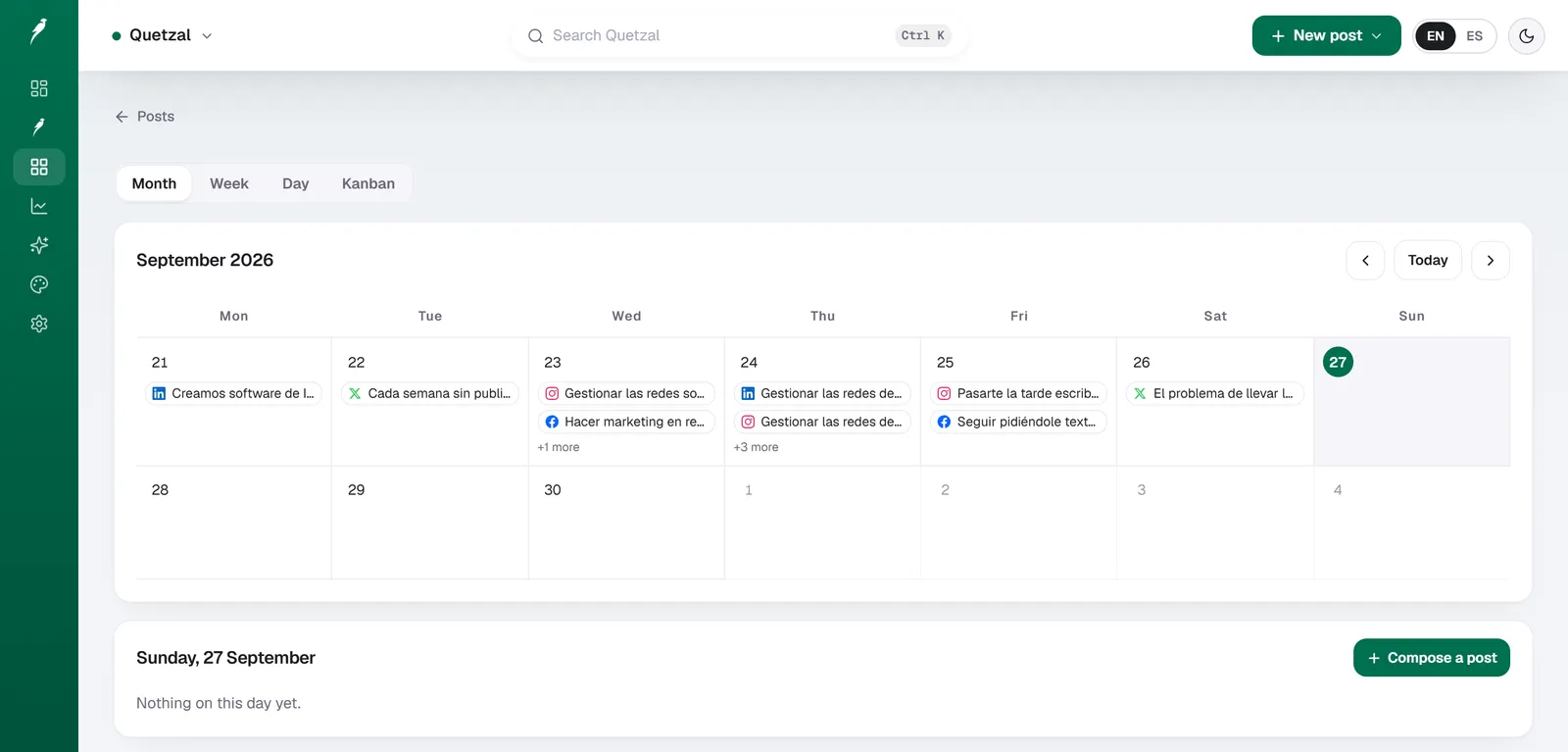
The Quetzal calendar on our own account in September 2026: every post the autopilot planned for LinkedIn, X, Instagram and Facebook, and underneath, the posts still waiting for approval. Our account publishes in Spanish.
How to schedule multiple posts natively in Meta Business Suite
Meta Business Suite serves as Facebook's native command center for Pages and connected Instagram accounts.
While it does not offer a single button to upload a spreadsheet of thirty posts at once, it allows you to build an extended queue of individual scheduled posts.
To schedule multiple posts sequentially in Meta Business Suite:
- Navigate to Meta Business Suite on your desktop browser and select your Page from the top-left dropdown menu.
- Click on the Planner tab in the left-hand navigation sidebar. This opens your calendar grid, which can be viewed by week or by month.
- Click the blue Create button in the upper right corner, or click the plus icon directly inside your target date on the calendar.
- Select your destination. You can choose to publish to your Facebook Page, your linked Instagram profile, or both simultaneously.
- Add your creative assets: upload your images or video, write your primary caption, insert emojis, and add location tags or tracking parameters.
- Scroll down to the Scheduling options section. Toggle the control from "Publish now" to "Schedule".
- Enter your desired date and time. Meta allows you to select any minute of the day. You can also view recommended times based on when your Page followers were most active over the previous seven days.
- Click the blue Schedule button in the bottom right corner.
- Return to the calendar grid and repeat steps 3 through 8 for each subsequent post you want to schedule.
Meta allows Pages to schedule content up to 75 days in advance. Once scheduled, your posts appear directly inside the Planner grid.
You can drag and drop posts to reschedule them, click any entry to edit its copy or media, or delete entries before they go live.
While effective for planning a few days ahead, this sequential method requires significant manual effort.
Scheduling fifteen posts means opening the editor fifteen separate times, uploading fifteen distinct assets, and setting fifteen independent date pickers.
Why Meta does not support native CSV bulk uploading
At one point, Facebook permitted Page administrators to upload bulk CSV spreadsheets containing post copy, timestamps, and media links via older Publishing Tools.
That functionality was removed during the consolidation into Creator Studio and the subsequent transition to Meta Business Suite.
Meta removed native spreadsheet uploading due to structural platform mechanics:
Media asset hosting friction: A CSV file cannot hold binary image or video files. It can only store text strings pointing to publicly accessible URLs where the media is hosted.
When users uploaded spreadsheets with broken links, restricted Google Drive URLs, or expired hosting permissions, uploads failed or published without graphics, creating a poor user experience.
Format complexity: Modern Facebook posts are rarely plain text. They involve multi-image carousels, vertical Reels, tag mentions, call-to-action buttons, and custom link previews. Encoding these rich features into spreadsheet rows proved clumsy and error-prone for most administrators.
Content quality control: Spreadsheet uploads facilitated mass link spamming. Meta's distribution systems prioritize content that drives meaningful interactions. Deprecating bulk spreadsheet uploads discouraged spam farms from flooding the feed with repetitive, unformatted posts.
Delegation to the Graph API: Meta moved programmatic bulk publishing to certified third parties. Instead of maintaining an internal CSV parser, Meta opened the Content Publishing API to software developers who build dedicated validation, media hosting, and preview environments before sending payloads to Facebook's servers.
Comparing methods for scheduling multiple Facebook posts
Depending on your team size, production volume, and technical workflow, there are three primary paths for queuing multiple posts on Facebook.
| Method | Multi-Post Workflow | Media Handling | Advance Window | Production Effort |
|---|---|---|---|---|
| Meta Business Suite (Native) | Sequential single-post creation via Planner | Direct local file upload per post | Up to 75 days | High: manual repetition for every post |
| Third-Party Schedulers (CSV) | Batch spreadsheet upload (Buffer, Hootsuite) | Must link to public asset URLs | Platform dependent (often unlimited) | Medium: manual spreadsheet drafting and asset hosting |
| Autonomous AI Autopilot (Quetzal) | Automated weekly queue generation | Automatic brand-aligned asset creation | Continuous rolling schedule | Low: review-and-approve or fully autonomous |
Each method addresses a different phase of the operational bottleneck.
Meta Business Suite solves the distribution problem for free, but requires manual labor for every post.
Traditional schedulers solve the multi-post upload problem, but require you to build spreadsheets and manage asset hosting.
Autonomous engines solve the upstream content production bottleneck alongside scheduling.
How third-party schedulers process bulk Facebook queues
If you manage a large backlog of pre-made graphics and copy, traditional social media management platforms such as Buffer, Hootsuite, or Metricool allow bulk scheduling via CSV import.
When using a third-party tool to schedule multiple Facebook posts at once, the software interacts with Meta's Graph API. The process follows strict technical parameters:
1. Spreadsheet structure
The scheduling platform requires a specifically formatted CSV file. While column headers vary slightly by platform, standard implementations require:
- Date and time: Formatted as
YYYY-MM-DD HH:MMorMM/DD/YYYY HH:MM. The file must specify whether timestamps are in UTC or a specific local time zone. - Message text: The exact caption, including hashtags and emojis.
- Media URL: A direct, publicly reachable link ending in an image extension (such as
.jpgor.png) or video container (such as.mp4). - Target URL: An optional destination link for link-preview posts.
2. Validation and asset ingestion
When you upload your CSV to the scheduling software, its servers crawl every media URL in the file.
The system downloads each image or video, verifies that it meets Facebook's aspect ratio and file size requirements, and stages the assets on internal cloud storage.
3. API payload delivery
When the scheduled time arrives, the scheduling platform makes an HTTPS POST call to Meta's /{page-id}/feed or /{page-id}/photos API endpoint.
The payload includes your Page access token, the caption text, and the staged media file. Meta processes the request, returns a post ID, and publishes the content to your Page feed.
Common failure points in bulk CSV scheduling
Bulk uploading through spreadsheets introduces several operational vulnerabilities:
- Authentication drops: If your Facebook Page authorization token expires or your Meta Business account permissions change, bulk queues fail silently until the connection is re-authenticated.
- Link preview mismatches: Facebook pulls Open Graph metadata directly from destination URLs. If a linked website lacks proper
og:imagetags, the published post may display an empty gray box instead of your intended graphic. - API rate limits: Meta imposes calls-per-hour limits on Page access tokens based on Page follower counts and engagement tiers. Submitting dozens of posts scheduled within minutes of each other can trigger temporary rate-limit blocks from Meta's API.
If you are evaluating dedicated scheduling platforms, you can review our breakdown of traditional queue management in our guide to Quetzal as a Buffer alternative.
Moving from manual scheduling to an automated publishing workflow
The central frustration with scheduling multiple posts on Facebook is rarely the scheduling interface itself. The true bottleneck is asset creation.
Before you can schedule twenty posts, you must complete several production steps:
- Write twenty captions
- Design twenty graphic layouts
- Resize them for mobile displays
- Source photography
- Export every file
Traditional scheduling tools simply move finished assets from your desktop to a queue; they do not help you make the content.
This is where the industry has shifted toward autonomous workflows. Rather than spending hours inside design software and spreadsheets, modern marketing teams use social media autopilots to handle production, scheduling, and distribution simultaneously.
Quetzal was built to solve this operational drain. Developed in Málaga, Spain, by two founders, Quetzal is an AI social media autopilot that operates as a complete production and publishing pipeline.
Instead of asking you to supply twenty images and twenty captions for a schedule, Quetzal generates designed static posts, ads, carousels, infographics, stories, captions, and AI video reels end to end.
Every asset is rendered in your business's visual identity, incorporating your exact logo, color palette, brand typography, and product photography.
For video reels, Quetzal authors the script, generates the AI voiceover, adds word-synced animated captions, and renders a finished video ready for distribution.
Once generated, Quetzal schedules and natively publishes your content across Facebook, Instagram, LinkedIn, TikTok, X, and YouTube.
Brands can choose to run Quetzal fully autonomously under standing brand guidelines, or retain complete control by requiring per-post approval before anything goes live.
Furthermore, scheduling should not be a static, one-way broadcast. Quetzal measures every published post at 1, 6, 24, and 72 hours.
It evaluates engagement velocity, audience retention, and interaction types to refine the visual styles, topics, and posting times for the following week's content queue.
To plan your long-term posting themes before committing to production, you can map your upcoming schedule using our free content calendar generator.
Best practices for managing a high-volume Facebook schedule
Whether you schedule multiple posts through Meta Business Suite, a CSV spreadsheet tool, or an autonomous system, managing a high-volume queue requires careful operational guardrails.
Maintain pacing intervals
Never schedule multiple posts to go live within minutes of each other. The Facebook news feed algorithm evaluates how initial viewers react to a post during its first hour.
If you publish a second post forty minutes after the first, you split your audience's attention and cannibalize the distribution reach of both updates.
Space standard feed posts at least three to four hours apart, or maintain a cadence of one high-quality post per day.
Diversify post formats across your queue
A queue consisting entirely of single images with link captions quickly suffers from algorithmic fatigue. When setting up a multi-post calendar, alternate between formats:
- Carousels: Ideal for educational content, product collections, and step-by-step breakdowns.
- Short-form vertical video (Reels): Facebook heavily prioritizes Reels across mobile feeds to compete with short-form video consumption.
- Single-image updates: Best for timely announcements, high-impact quotes, and company updates.
- Text-focused discussion prompts: Direct questions that prompt comments help maintain Page activity between major media campaigns.
Establish a schedule pause procedure
Always maintain an operational protocol for pausing your scheduled posts. During breaking national news, global crises, or acute brand emergencies, automated marketing posts appear tone-deaf and unprofessional.
If you use Meta Business Suite, you must open the Planner grid, locate upcoming posts, and manually reschedule or draft them.
If you manage queues through software like Quetzal, you can pause scheduled publishing with a single toggle across all connected networks until normal operations resume.
Verify cross-posting behavior
Meta Business Suite makes it easy to schedule a single asset simultaneously to Facebook and Instagram. However, native platform conventions differ:
- Facebook supports active hyperlinks inside post captions; Instagram does not make caption URLs clickable.
- Facebook feeds accommodate landscape, square, and vertical aspect ratios; Instagram grids crop previews strictly.
- Heavy hashtag blocks look natural on Instagram but reduce readability and engagement on Facebook business feeds.
If you schedule across both platforms at once, ensure your publishing tool allows customized caption fields for each channel.
You can inspect how our platform orchestrates multi-network distribution on the Quetzal product overview.
Turn your weekly scheduling into automated publishing
Quetzal handles the production work instead of just organising finished files, generating static posts, carousels, stories, captions, and complete video reels end to end.
Every graphic and video incorporates your exact logo, color palette, fonts, and product photos so your scheduled content never looks like generic templates.
In addition, Quetzal measures each post at 1, 6, 24, and 72 hours to plan subsequent queues around what actually drives engagement.
To see an entire week of tailored content created for your business in about three minutes, try Quetzal free on your own website.
FAQ
How many posts can you schedule at once on Facebook?
Inside Meta Business Suite, there is no documented hard limit on the total number of posts you can hold in your calendar queue, though each must be created individually up to 75 days in advance. Third-party publishing platforms using the Facebook Graph API can queue hundreds of posts at once via CSV spreadsheets, subject to the individual tool's account limits and Meta's standard hourly API rate limits.
How far in advance can you schedule Facebook posts?
Native Meta Business Suite allows you to schedule feed posts, stories, and reels up to 75 days ahead of time. If you need to plan marketing initiatives beyond that 75-day boundary, you must organize assets in an external calendar tool or use a third-party management platform that stores scheduled drafts on its own servers until the 75-day native window opens.
Can you schedule multiple posts to a personal Facebook profile?
No. Meta does not support native post scheduling for personal profiles, and Meta's Graph API explicitly prohibits third-party publishing tools from scheduling content to personal timelines. Post scheduling is restricted to Facebook Business Pages, community pages, and personal profiles that have activated Facebook Professional Mode.
Does scheduling posts hurt Facebook algorithm reach?
No. Meta's distribution algorithm treats scheduled posts identically to posts published live in real time. Reach is governed by audience engagement, watch time, shares, and content quality, rather than whether the update was published manually or triggered via Meta Business Suite or an official Graph API publishing integration.
Sources
- Meta Business Suite Interface Documentation (Platform Mechanics)
- Meta Graph API Content Publishing Specification (Platform Mechanics)
Really made with Quetzal
Real product output, untouched. What you see is what it generates.