Best tools · September 29, 2026
Best Free Social Media Management Tools (2026 Guide)
Discover the best free social media management tools in 2026. Compare free plans, post limits, AI capabilities, and workflows to pick the right platform.
 By Sergio · Co-founder of Quetzal

The best free social media management tools in 2026 are Buffer for clean multi-channel scheduling, Metricool for detailed profile and competitor analytics, and Publer for flexible post customization across basic networks. While these free plans handle distribution, they require you to design every asset yourself unless paired with automated generative workflows.
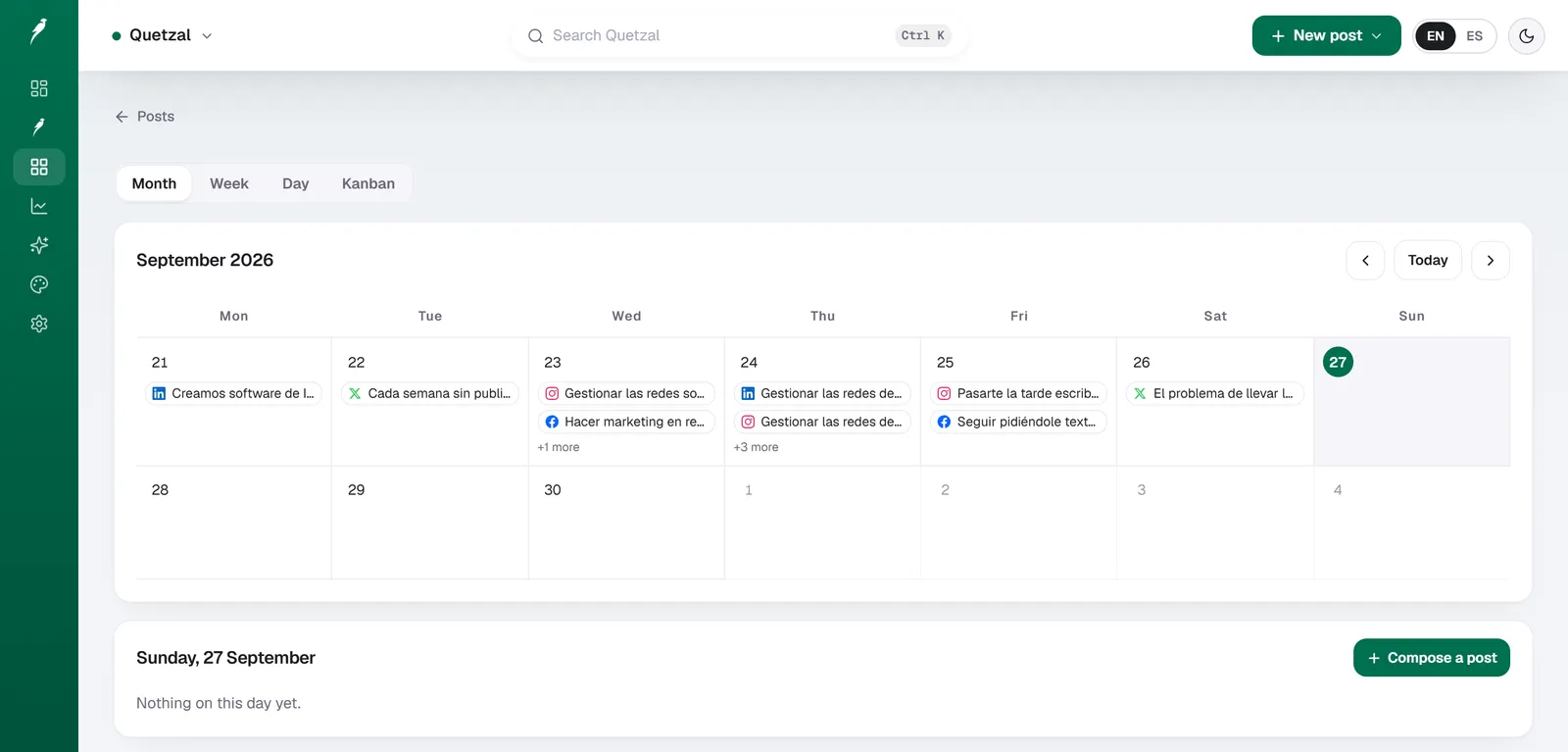
The Quetzal calendar on our own account in September 2026: every post the autopilot planned for LinkedIn, X, Instagram and Facebook, and underneath, the posts still waiting for approval. Our account publishes in Spanish.
What free social media management tools actually offer in 2026
Zero-cost social media software plays a specific role in a digital marketing stack. Most free plans function as functional entry tiers rather than complete marketing engines. Software vendors configure these tiers to allow individuals and small operations to establish a presence, but they impose strict boundaries on three primary variables: profile capacity, scheduling volume, and operational automation.
Understanding these boundaries prevents wasted setup time:
- Profile connection limits: Most free plans cap connected channels at three accounts. This typically forces a business to pick between its primary channels (such as Instagram, LinkedIn, and Facebook) while leaving TikTok, YouTube, or X unmanaged.
- Queue and post volume restrictions: Free tiers generally restrict either the active scheduling queue (capping pending posts at 5 to 10 items per channel) or monthly outbound volume (capping publications at 30 to 50 posts per month). Once your queue is full, you cannot schedule further content until older posts go live.
- Analytics cutoffs: Free accounts usually provide short data retention windows, often between 7 and 30 days. Longitudinal reporting, exportable client PDFs, and deep audience demographics remain locked behind premium subscriptions.
- The creation bottleneck: Traditional free scheduling platforms do not create your assets. They provide empty calendar slots that you must manually populate with finished images, edited video clips, and written copy.
When planning a content pipeline, teams frequently realize that scheduling empty slots is easy, but producing creative assets is the actual bottleneck. Rather than spending hours drafting placeholders manually, you can generate a full week of branded content on Quetzal's free interactive demo without creating an account or providing payment details, showing immediately how automated production fits into your calendar. If you simply need a structured planning template before committing to any software, an interactive free content calendar tool can also map out your monthly campaign themes in advance.
Free social media management tools compared
The following table summarizes the free tiers and structural limits of the leading platforms available in 2026.
| Tool | Free channels | Queue or post limits | Native AI capabilities | Primary limitation |
|---|---|---|---|---|
| Buffer | Up to 3 channels | 10 posts per channel queue | Text generation and rewriting | Strict 10-post queue cap |
| Metricool | 1 brand (up to 5 profiles) | 50 posts per month | Prompt-based caption assistant | Limited analytics history |
| Publer | Up to 3 accounts | 10 pending posts total | Basic text completion prompts | Restricted media storage |
| Later | 1 profile set | Limited monthly post quota | Caption and hashtag assistant | Weak non-visual formatting |
| Predis.ai | 1 brand workspace | 15 AI-generated posts per month | Full-canvas asset generation | Watermarked free exports |
| Ocoya | 1 workspace | Limited post runs | Copywriting and product sync | Sluggish template styling |
| Quetzal | Instant web demo access | Full weekly campaign output | Autonomous video and graphics | Younger feature footprint |
Source: Platform interface specifications and plan limits, 2026
In-depth evaluations of the top free tools
To select the right software, you must examine how each platform balances publishing, analytics, and content generation. Below are detailed evaluations of seven prominent platforms operating in 2026.
Buffer
- What it is: Buffer is a lightweight social media scheduling utility designed to queue updates across major social networks from a clean, unified feed.
- Best for: Solo creators, consultants, and micro-businesses that need an intuitive, distraction-free queue to distribute content across one to three core profiles.
- AI capabilities: Includes an integrated text assistant that helps rewrite captions, generate alternative hooks, and summarize long-form articles into short social posts.
- Pricing and free access: Buffer provides a permanent free plan covering up to 3 channels with a limit of 10 scheduled posts per channel; paid plans begin at approximately 6 EUR per month per connected channel.
- Core strength: The interface remains one of the cleanest in the industry, making routine post queuing fast and accessible with almost no learning curve.
- Honest drawback: The 10-post queue limit per channel means that if you post daily, you must log in every week to refill the calendar, and the free tier completely excludes community engagement tools. Those evaluating simple publishing mechanics can review our Buffer alternative breakdown for side-by-side workflow comparisons.
Metricool
- What it is: Metricool is an analytics-focused social media planner that tracks profile performance, competitor benchmarks, and cross-platform scheduling.
- Best for: Data-driven small business owners and solo marketing managers who require robust reporting and profile analytics alongside standard calendar scheduling.
- AI capabilities: Features a basic AI caption assistant that suggests post copy, tone adjustments, and hashtag recommendations based on manual text prompts.
- Pricing and free access: The free plan allows connection of 1 brand profile (which includes up to 5 social network accounts) and scheduling for up to 50 posts per month; paid tiers begin at roughly 18 EUR per month billed annually.
- Core strength: Metricool provides the most generous operational allowance among traditional schedulers, pairing 50 free monthly posts with detailed competitor tracking.
- Honest drawback: The user interface prioritizes charts and data points, making the calendar composition experience feel dense and clinical compared to visual planners. For teams prioritizing metrics over creation, reviewing our guide to the best social media analytics tools provides extra context on measurement depths.
Publer
- What it is: Publer is a multi-platform social media scheduler featuring visual calendar planning, link-in-bio management, and multi-network post adaptation.
- Best for: Content creators and small digital teams who frequently cross-post varied links, photos, and short updates across multiple platforms.
- AI capabilities: Offers built-in text completion prompts, caption rewriting algorithms, and integrations with third-party generative imaging engines on paid tiers.
- Pricing and free access: Publer includes a permanent free tier supporting up to 3 social accounts with a ceiling of 10 pending scheduled posts in total across the workspace; paid plans start at roughly 12 EUR per month.
- Core strength: The composer window allows deep customization of individual posts per network (such as tailoring character counts or thread structures) in a single screen.
- Honest drawback: The 10-post aggregate queue limit is shared across all 3 accounts, meaning that three scheduled posts on three accounts consume almost your entire allowance instantly.
Later
- What it is: Later is a visual-first social marketing platform focused on Instagram feed curation, visual story boards, and media library organization.
- Best for: Photographers, lifestyle brands, and boutique e-commerce stores whose primary engagement driver is an aesthetically cohesive Instagram feed.
- AI capabilities: Provides caption generation assistants and automated hashtag generators derived from visual descriptions and keywords.
- Pricing and free access: Later offers limited free access plans for single profile sets with low monthly post volumes; paid plans start at roughly 25 EUR per month.
- Core strength: The visual drag-and-drop Instagram grid preview allows businesses to curate visual aesthetics and color stories before publishing assets live.
- Honest drawback: The platform is heavily skewed toward visual networks; managing professional, text-centric updates on networks like LinkedIn or X feels cumbersome and secondary.
Predis.ai
- What it is: Predis.ai is an AI-centric content creation engine that generates complete visual assets, carousels, and captions from short text prompts.
- Best for: Solo operators who lack graphic design skills and need an automated system to generate complete image templates rather than manually arranging layouts.
- AI capabilities: Generates multi-slide carousels, static graphic banners, short video animations, and corresponding captions from a single topic or e-commerce URL.
- Pricing and free access: A free tier provides around 15 AI-generated posts per month, though outputs carry platform watermarks; paid plans start at approximately 29 EUR per month.
- Core strength: Bridges the gap between graphic design software and scheduling by producing the actual visual files inside the platform.
- Honest drawback: Generated templates can appear repetitive and require manual typography fine-tuning to avoid looking generic. If video content is your primary visual medium, examining the best AI video generators for social media helps clarify dedicated video workflows versus template animators.
Ocoya
- What it is: Ocoya is an e-commerce marketing platform that integrates product catalogs with automated visual graphic generation and social scheduling.
- Best for: Direct-to-consumer store owners running Shopify or WooCommerce who want to turn inventory listings into promotional banners quickly.
- AI capabilities: Features copywriting models trained on e-commerce frameworks, automated image background removal, and dynamic product graphic composition.
- Pricing and free access: Offers limited free entry access with paid plans beginning at approximately 19 EUR per month.
- Core strength: Direct API connections with major e-commerce platforms enable users to pull live product photos directly into promotional graphics without manual uploads.
- Honest drawback: The design editor can feel sluggish when handling large asset catalogs, and template styling options require significant manual correction to match strict brand guidelines.
Quetzal
- What it is: Quetzal is an AI social media autopilot built in Málaga, Spain, by two founders that handles the complete production and publishing lifecycle.
- Best for: Small businesses, professional service providers, and lean marketing teams that want fully finished, on-brand graphics and videos published without manual design work.
- AI capabilities: Fully autonomous production: generates designed static posts, ads, carousels, infographics, stories, captions, and complete AI video reels (including script, AI voiceover, word-synced captions, and final edited render) in the brand's own visual identity (logo, palette, fonts, product photos). It schedules and publishes to Instagram, Facebook, LinkedIn, TikTok, X, and YouTube, measuring every post at 1, 6, 24, and 72 hours to optimize future output.
- Pricing and free access: Genuinely free instant testing via a web-based demo requiring no account, no email, and no credit card; full software plans are priced at 79 EUR per month billed annually (89 USD outside Europe) following a 14-day free trial that requires no payment card.
- Core strength: Eliminates manual asset creation entirely by producing platform-ready graphics and video reels that strictly match existing brand visual standards, running autonomously or via per-post approval.
- Honest drawback: As a newer specialist platform focused on automated production and publishing across six core networks, it does not include deep legacy social listening or enterprise community management tools.
Choosing a free tool based on your operational model
Selecting among free options depends on where your primary operational bottleneck lies. Different business models require different trade-offs:
Solo operators with existing visual assets
If you already take high-quality photos or design your own marketing graphics in software like Photoshop or Canva, distribution is your only hurdle. A lightweight free scheduler like Buffer or Publer is ideal. You can upload your finished assets, write your captions, and maintain a consistent queue across your top two or three social channels without spending any budget.
Analytical small businesses tracking competitors
If your primary objective is monitoring local market competition and tracking follower engagement metrics, Metricool provides the highest utility. Its 50-post monthly allowance allows for daily posting on a primary channel, and its comparative analytics deliver insights that most competitors reserve for premium plans.
Lean operations facing a creative bottleneck
If your core challenge is not the scheduling process itself, but finding the time to write scripts, create graphics, format carousels, and edit video reels, standard scheduling tools will not solve your problem. A blank calendar provides no value if you do not have the hours to populate it. In this scenario, combining free testing tools with automated systems allows you to maintain professional consistency without dedicating ten hours every week to content drafting.
For growing businesses that eventually expand past solo operations into managing multiple brands, reviewing our evaluation of the best social media tools for agencies clarifies when it becomes necessary to migrate from free plans to multi-client workspace architecture.
Test your brand's automated social pipeline for free
Free scheduling software solves the distribution problem, but it still leaves you with the daily burden of designing visuals, writing copy, and editing video clips. Rather than spending your evenings building graphics manually, you can see how autonomous production looks for your own business by testing Quetzal's free instant demo, which scans your website and renders a week of branded posts in three minutes.
FAQ
Can you run a business social media presence entirely on free tools?
Yes, a business can maintain a baseline social media presence using free scheduling tiers, provided you only publish across two or three networks and do not mind refilling your queue every week. However, free tools require you to manually design every image, write every caption, and record every video yourself. As posting volume expands, the manual hours required to feed free schedulers typically exceed the cost of dedicated production software.
Why do most free social media tools restrict scheduling queues?
Software vendors restrict scheduling queues to cover their ongoing server, database, and social network API maintenance costs while encouraging active users to upgrade. Capping pending posts at 10 items keeps storage loads manageable and ensures that free users interact with the application regularly. These limitations allow vendors to offer stable infrastructure without charging entry fees.
Do free social media tools support automated video publishing?
Most traditional free tiers support basic video uploads, but they require you to provide a completely finished, edited video file in the correct aspect ratio and codec. They do not write scripts, generate voiceovers, or add synchronized subtitles automatically. Platforms that offer automated AI video generation generally restrict video creation to short trial runs or place watermarks over free exports.
What is the difference between a free tool and an autopilot platform?
A free social media management tool acts as an empty scheduling container that publishes files you upload manually. An autopilot platform creates the underlying marketing materials for you, generating tailored graphics, carousels, captions, and edited video reels that adhere to your brand guidelines before publishing them automatically. The former solves message distribution, while the latter solves content production.
Sources
- Quetzal Platform Mechanics and Architecture Specifications (internal technical documentation)
Keep reading



See what Quetzal would do with your brand
Type your website and in about 3 minutes you get a real week of content with your logo, colors and voice. Free, no signup.