Guide · September 12, 2026
AI Video for Social Media: The 2026 Production Guide
Explore how AI video for social media works in 2026. Learn about multi-step rendering pipelines, vertical platform specs, kinetic captions, and workflows.
 By Sergio · Co-founder of Quetzal

AI video for social media refers to using generative models and automated rendering pipelines to produce complete, platform-ready video content without manual timeline editing. In 2026, modern systems handle the entire production sequence: extracting core brand messaging, generating narrative scripts, synthesizing natural voiceovers, aligning word-synced kinetic captions, and assembling branded visual assets into high-definition vertical video.
Quetzal automates this entire sequence by generating AI video reels end to end, assembling scripts, natural voiceovers, word-synced captions, and finished renders in the brand's own logo, palette, fonts, and product photos. Instead of managing separate tools, you can try it free on your own website to see how it builds complete, platform-ready video content.
The transition from manual video production to programmatic automation has fundamentally reshaped how brands maintain visibility. Producing vertical short-form video historically required dedicated scriptwriters, voice talent, motion graphic designers, and video editors.
That process routinely took three to five business days per asset. Today, automated video production pipelines compress that workflow into minutes while maintaining strict visual identity guidelines.
Understanding how these systems operate under the hood is critical for any team seeking to scale production across networks like TikTok, Instagram Reels, YouTube Shorts, and LinkedIn Video without sacrificing brand integrity.
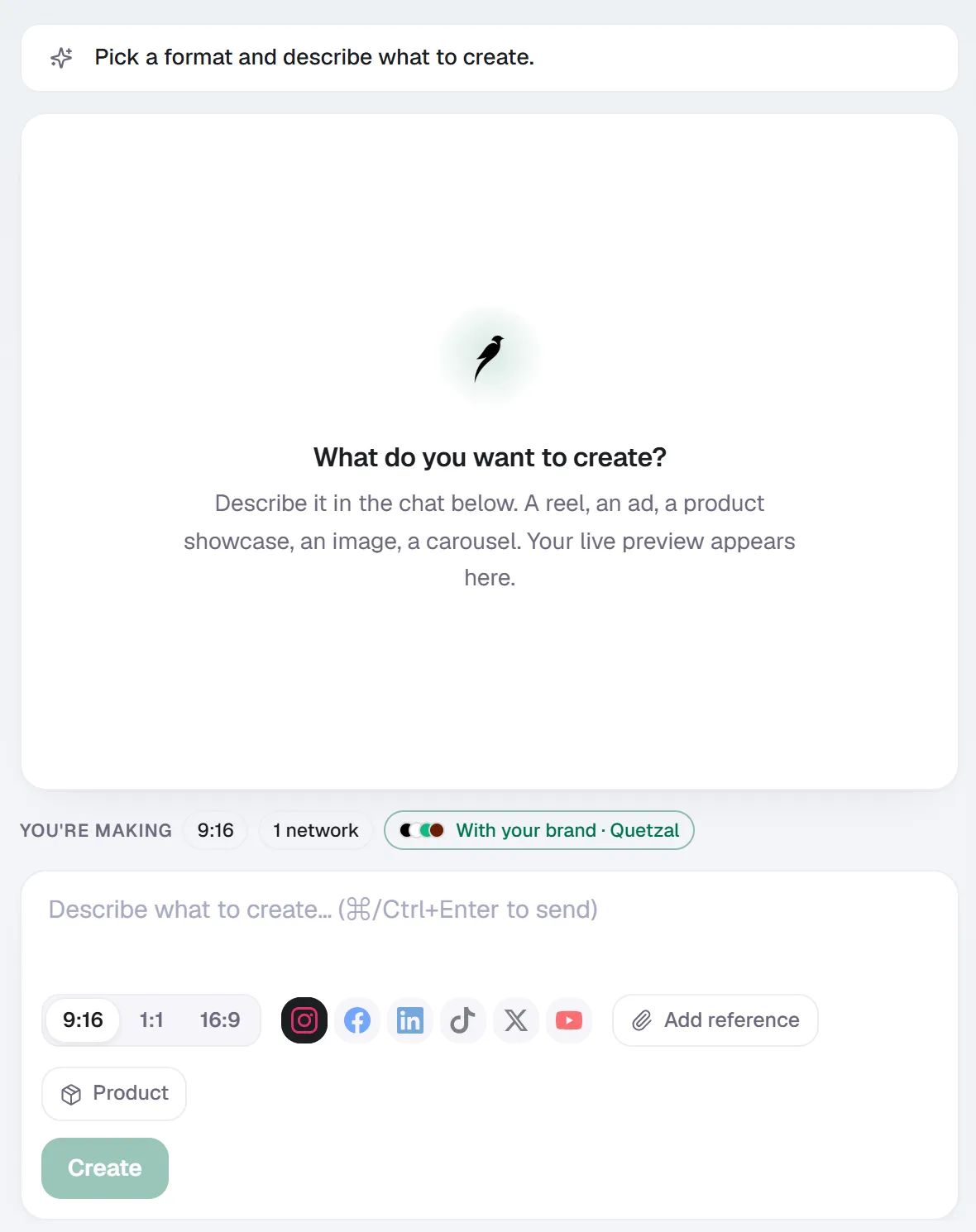
Create in Quetzal: describe the piece in a sentence, pick the format and the networks, and it is made with your brand applied.
The technical architecture of an AI video pipeline
A production-grade AI video engine does not rely on a single generative model. Generating an engaging social video requires an orchestrated pipeline of specialized machine learning models and deterministic rendering engines working in sequence.
[Raw Context / URL]
       │
       ▼
[1. Script Generation (LLM)] ──► Hook, Body Pacing, Audio Directives
       │
       ▼
[2. Voice Synthesis (Neural TTS)] ──► Audio Track + Phoneme Timing
       │
       ▼
[3. Forced Alignment] ──► Sub-millisecond Word Timestamps
       │
       ▼
[4. Visual Assembly Engine] ──► Brand Palette, Typography, Product Media
       │
       ▼
[5. Headless Compositor] ──► 1080x1920 60fps MP4 Video Render
1. Script synthesis and structural pacing
The pipeline begins by ingesting source material, such as a product page, an industry update, or a long-form article. A large language model processes this input to generate a script structured specifically for social retention.
Unlike long-form copy, social video scripts require a defined hook in the opening 1.5 seconds, rapid information density in the middle sections, and a clear call to action at the close. The script is broken down into discrete scene cues with explicit visual instructions.
2. Neural voiceover generation
The text output routes to a neural text-to-speech engine. Current voice synthesis models do not sound robotic; they generate speech with natural cadence, contextual inflection, and breathing pauses.
The synthesized speech file is normalized to social audio standards, typically calibrated between -14 and -16 LUFS (Loudness Units Full Scale), ensuring the audio does not clip or sound muffled against native platform audio.
3. Forced alignment and word-level timestamping
To display animated subtitles that match the audio with sub-millisecond precision, the pipeline passes the synthetic audio file and the script through a forced-alignment model. This extracts exact start and end timestamps for every spoken word.
These timestamps allow the rendering engine to trigger kinetic typography effects, highlighting words exactly as the voiceover pronounces them.
4. Dynamic visual asset compositing
Pure text-to-video diffusion models (which generate raw video pixels from text prompts) frequently produce shifting visual artifacts, anatomical errors, and illegible text. For commercial social media, deterministic compositors are far more effective.
The pipeline selects high-resolution product photography, brand illustrations, kinetic graphic elements, and vector overlays. These assets are positioned according to strict visual layout rules, ensuring that visual hierarchy, margins, and brand fonts remain consistent across every frame.
5. Final render and container encoding
A headless video renderer (such as FFmpeg or programmatic canvas engines) composites the layers: background animations, static imagery, dynamic vector elements, synchronized subtitle tracks, and audio. The output is encoded as an H.264 or H.265 MP4 file at 1080x1920 resolution, optimized for mobile streaming.
To see how this process operates inside a fully automated workflow, you can explore the underlying engine on the Quetzal product breakdown, which details how generation, scheduling, and rendering integrate across six major networks.
Comparing short-form video requirements across social networks
Deploying AI video across social channels requires building assets that fit each network's technical limits and audience behaviors. While 9:16 vertical video is standard, platform specifications diverge in file size limits, optimal runtimes, and user sound habits.
| Platform | Recommended Aspect Ratio | Optimal Duration | Default Audio State | Primary Technical Focus |
|---|---|---|---|---|
| TikTok | 9:16 (1080x1920) | 18–34 seconds | Sound on | Fast visual pacing, native kinetic fonts, prominent opening hook |
| Instagram Reels | 9:16 (1080x1920) | 15–30 seconds | Sound on / off split | Clean upper-third framing to avoid native UI overlay occlusion |
| YouTube Shorts | 9:16 (1080x1920) | 30–50 seconds | Sound on | Narrative depth, high completion rates, prominent bottom title clearance |
| LinkedIn Video | 9:16 or 1:1 | 30–60 seconds | Sound off (predominantly) | High-contrast subtitles, professional data visuals, direct business value |
| Facebook Reels | 9:16 (1080x1920) | 20–45 seconds | Sound on / off split | Broad narrative clarity, readable typography on varied screen sizes |
| X (formerly Twitter) | 9:16 or 1:1 | 15–30 seconds | Sound off | Immediate visual context, fast scroll interruption, standalone text readability |
Source: Platform video specifications and delivery standards, 2026
Designing an automated rendering pipeline requires accounting for the "safe zones" of each platform. For example, TikTok overlays username descriptions, sound titles, and engagement icons down the right margin and across the bottom 20% of the screen.
Instagram Reels places UI elements in similar positions, though with different offsets. A well-engineered AI video system automatically bounds all critical text and visual focal points within a safe visual rectangle, preventing platform interfaces from obscuring kinetic subtitles or product imagery.
Generative video formats that drive actual business outcomes
Many organizations make the mistake of using AI video tools solely to generate abstract, dream-like diffusion sequences that attract brief curiosity but fail to generate commercial engagement. High-performing automated video relies on formats designed around clear information transfer.
Kinetic breakdown reels
Kinetic reels use clean motion graphics, high-contrast typography, and dynamic transitions to explain complex ideas, industry data, or service frameworks. Because the visual momentum is carried by the synchronized typography and iconography, these videos retain high average watch times even among users browsing in silent environments.
Product context showcases
Instead of static product photos, automated pipelines can ingest e-commerce catalog photos, remove backgrounds, place products in branded virtual spaces, and apply subtle camera motion effects (such as simulated zooms, orbital pans, and dimensional shifts). Paired with an AI voiceover outlining specific features, these assets function as high-converting organic posts or paid social advertisements.
Data-driven vertical infographics
Transforming statistical reports, survey findings, or industry benchmarks into animated vertical charts allows brands to establish authority quickly. The pipeline animates numbers counting up, bar charts extending, and key takeaways highlighted sequentially.
This format is particularly effective on LinkedIn and X, where professional audiences prioritize rapid, actionable data over lifestyle entertainment.
If you are developing a comprehensive generation workflow, reading our guide on the AI social media content generator landscape explains how static and dynamic assets complement video across a broader editorial calendar.
The operational workflow: from web URL to scheduled vertical reel
Deploying AI video effectively means eliminating manual friction between concept and publication. An enterprise-grade workflow follows a continuous operational loop:
Step 1: Context Ingestion (Website, Product Catalog, Brand Kit)
   │
Step 2: Generation (Script, Voiceover, Subtitles, Compositing)
   │
Step 3: Verification (Brand Guidelines or Manual Editorial Sign-off)
   │
Step 4: Cross-Platform Publishing (Direct API Dispatch)
   │
Step 5: Performance Measurement (1h, 6h, 24h, 72h Retention Telemetry)
- Brand ingestion and asset mapping: The system crawls your digital touchpoints (such as your website or product documentation) to extract your visual identity. It pulls primary and secondary hex color palettes, typography rules, logos, and high-resolution product photography.
- Autonomous production: The rendering engine generates the video end to end. The script is created based on current topic priorities, the synthetic voiceover is recorded, subtitles are generated with millisecond-accurate timestamps, and the final MP4 is rendered.
- Editorial review or continuous delivery: Depending on operational preferences, the generated reel is either staged for manual team approval or sent directly into the publishing queue under standing brand guidelines.
- Programmatic scheduling: The video is dispatched via platform APIs to TikTok, Instagram, YouTube, Facebook, LinkedIn, and X, scheduling each post for the specific hour when your audience demonstrates maximum responsiveness.
- Post-publish telemetry: Performance data is tracked across defined time intervals to evaluate retention and refine future generations.
Organizations that manage multiple brands or client rosters often implement this workflow through specialized agency frameworks. You can read more about operational structures in our analysis of the AI social media agency model.
Balancing automation with brand safety: approval systems
Entrusting video production to software requires strong quality controls. Purely autonomous systems operating without guardrails risk publishing off-brand phrasing, misaligned assets, or awkward visual pacing.
Effective platforms solve this by offering dual operating modes:
- Standing brand guidelines (Autonomous autopilot): The system operates within strictly defined boundary rules. It references whitelisted fonts, approved color palettes, prohibited term lists, and predefined layout structures. If a generated video passes all automated compliance checks, it schedules and publishes autonomously.
- Per-post approval (Human-in-the-loop): The pipeline produces finished, rendered video reels and queues them in an editorial dashboard. Team members can preview the exact video playback, verify the audio synchronization, inspect the caption wording, and approve or reject the post with a single click.
AI Video Rendered
       │
       ▼
Meets Automated Compliance Checks?
      ╱ ╲
    YES  NO ──► Flagged for Revision
    ╱
   ▼
Operating Mode?
  ├── Autonomous ──────────► Direct Platform API Dispatch
  └── Per-Post Approval ───► Staged in Dashboard for One-Click Sign-Off
Establishing a clear governance framework prevents operational bottlenecks while safeguarding the brand's public reputation. For an in-depth breakdown of governance structures, review our complete guide on the social media content approval process.
Feedback loops: how post-publish metrics optimize subsequent generations
The key advantage of an integrated AI autopilot over a standalone video editor is the closed feedback loop. When a human editor exports an MP4 and hands it to a social media manager, the performance metrics rarely make their way back into the editing software to refine the next video cut.
An autonomous system measures every published video at specific intervals: 1 hour, 6 hours, 24 hours, and 72 hours.
Post Published
      │
      ├─► 1 Hour:   Immediate hook velocity & initial scroll-stop rate
      ├─► 6 Hours:  Algorithmic distribution uptake & watch-time curve
      ├─► 24 Hours: Total completion rate & profile navigation rate
      └─► 72 Hours: Final engagement ratio & audience conversion signals
- 1-Hour telemetry: Tracks early hook velocity. Did viewers drop off within the first 1.5 seconds? If early drop-off is high, the system adjusts future generations to use more provocative opening hooks, faster visual movement, or earlier subtitle entry.
- 6-Hour telemetry: Evaluates initial distribution uptake. The platform tracks whether the host algorithm pushed the video beyond the initial follower core into discovery feeds (such as the TikTok For You Page or Instagram Explore).
- 24-Hour telemetry: Assesses the completion rate curve. Did viewers watch through the mid-point? If viewer retention dips at second 12, subsequent scripts are generated with tighter pacing and earlier narrative shifts.
- 72-Hour telemetry: Consolidates final engagement metrics (shares, saves, and comments) to identify which content formats generated genuine interest versus passive consumption.
By feeding these measurements back into the prompt design and pacing models, the system continuously refines the next week's editorial calendar.
See automated video production built on your brand assets
Quetzal handles the entire production workflow by generating finished AI video reels end to end, including scripts, AI voiceovers, word-synced captions, and visual assets styled in your own logo, palette, fonts, and product photos.
The platform publishes directly across six networks (Instagram, Facebook, LinkedIn, TikTok, X, and YouTube) and measures performance at 1, 6, 24, and 72 hours to refine future content automatically.
Teams maintain complete operational control by running either on full autopilot under standing brand guidelines or requiring per-post approval before anything goes live. To see a full week of branded content created from your website in about 3 minutes with no signup required, explore the Quetzal demo.
Frequently asked questions
Can AI video completely replace a human video editor?
For standard social media formats, educational reels, product features, and animated updates, modern AI video pipelines can fully replace manual editing timelines. However, human editors remain essential for long-form narrative films, on-location documentary footage, nuanced personal vlogs, and creative productions requiring subjective emotional directing.
How do social media algorithms treat AI-generated video?
Social platforms evaluate content based on user engagement metrics: watch time, completion rates, re-watches, comments, and shares. Algorithms do not penalize content simply because it was assembled using AI tools.
As long as the video maintains high production standards, avoids spam patterns, and delivers value that keeps viewers watching, automated video performs on equal footing with manually edited media.
What is the optimal length for an AI-generated vertical video?
For platforms like TikTok and Instagram Reels, the highest completion rates typically occur between 18 and 30 seconds. This window provides enough time to deliver a substantive insight or showcase a product without triggering audience drop-off.
For YouTube Shorts and LinkedIn Video, videos running between 30 and 50 seconds often perform better by offering deeper educational context.
How does voice synchronization work in automated video tools?
Voice synchronization uses forced-alignment machine learning models. The system aligns the generated script text with the acoustic waveform of the synthesized speech file, identifying the exact millisecond each phoneme and word is spoken.
The rendering engine uses these timing markers to trigger subtitle color changes, text reveals, and visual scene transitions in lockstep with the audio.
Sources
- Platform video specifications, container constraints, and safe zone guidelines reflect verified 2026 technical documentation across Meta, ByteDance, YouTube, and LinkedIn developer portals.
- Performance feedback loop mechanics and automated rendering architectures reflect verified operational specifications from Quetzal product documentation.
Really made with Quetzal
Real product output, untouched. What you see is what it generates.