Comparison · September 22, 2026
Planoly vs Buffer: Which Scheduler Fits Your Team in 2026?
Planoly vs Buffer: compare pricing, visual grid planning, supported channels, and automated workflows to pick the right social scheduler in 2026.
 By Jaime · Co-founder of Quetzal

Planoly is designed for visual-first creators and e-commerce brands prioritizing an aesthetic Instagram grid, TikTok planning, and Pinterest curation. Buffer is built for cross-platform distribution, offering a modular queue and per-channel pricing across networks like LinkedIn, Bluesky, and Mastodon.
Choose Quetzal if you want an AI autopilot that creates branded posts and video reels from scratch; choose Planoly for visual feed design; choose Buffer for lightweight, multi-network text and link publishing.
If your team wants to eliminate manual asset production, Quetzal creates designed posts, carousels, and video reels in your brand visual identity and publishes them across six networks. You can try it free on your own website to see a full week of ready-to-post content in three minutes.
It continuously measures post performance to optimize future publishing.
Choosing between Planoly and Buffer comes down to whether your publishing strategy begins with a visual aesthetic or a cross-platform distribution schedule. While both platforms have evolved beyond their original niches, their core architectures reflect distinct philosophies.
Planoly began as an Instagram grid management tool tailored to fashion, beauty, lifestyle, and visual commerce brands. Buffer emerged as a minimalist scheduling queue designed to syndicate links, commentary, and media across diverse social networks without interface friction.
In 2026, social teams face a fragmented network landscape alongside rising demands for short-form video and multimodal content. Deciding which platform deserves your subscription requires understanding how each tool handles pricing, visual curation, platform support, and team workflows.
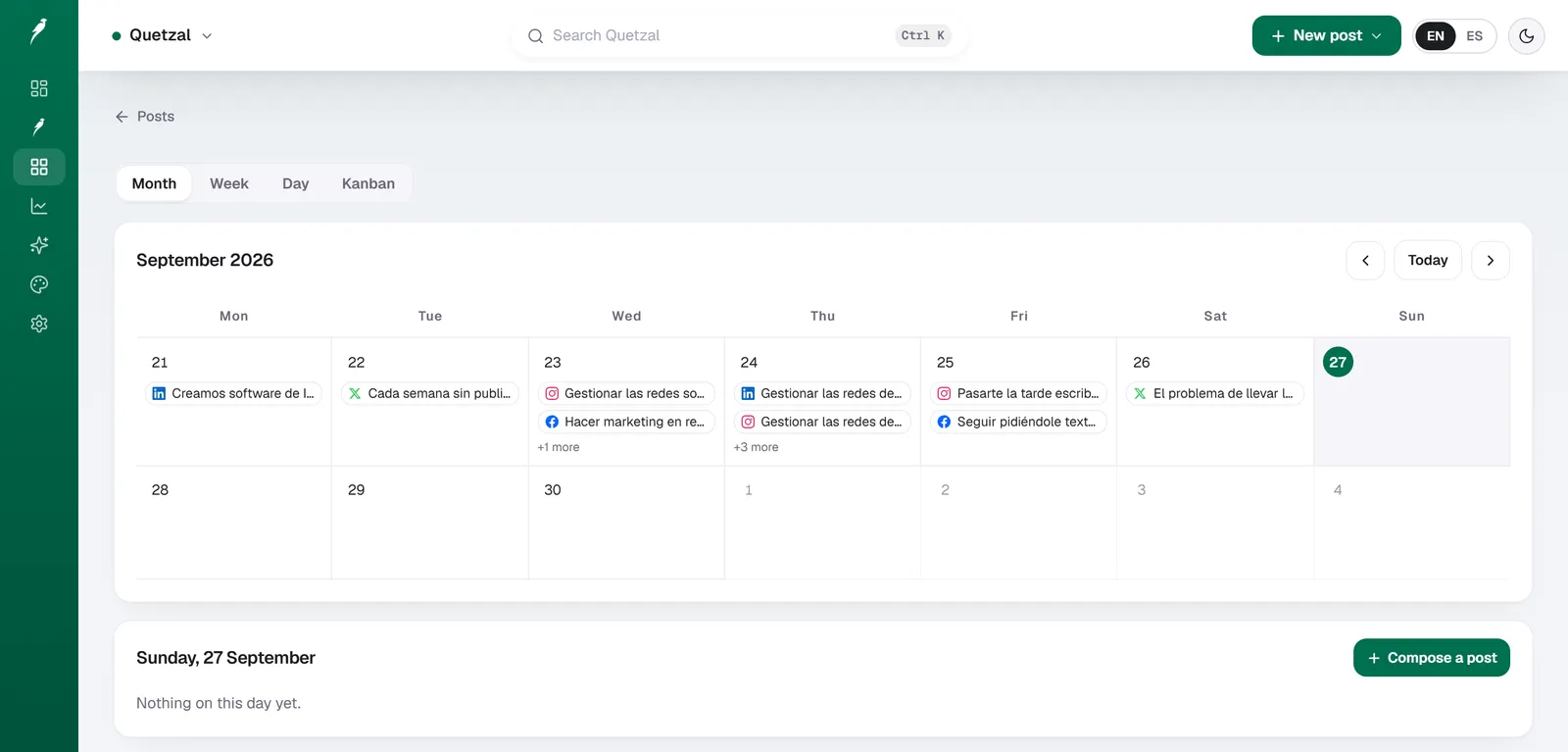
The Quetzal calendar on our own account in September 2026: every post the autopilot planned for LinkedIn, X, Instagram and Facebook, and underneath, the posts still waiting for approval. Our account publishes in Spanish.
Core differences at a glance: visual curation versus multi-channel syndication
The fundamental difference between Planoly and Buffer lies in how each platform structures the post-creation process.
Planoly is built around a calendar and visual grid workspace. When you open Planoly, your primary point of interaction is an interactive preview of how future posts will look alongside existing published content.
You can drag and drop images, reorder scheduled tiles, and plan visual themes before committing to a schedule. This makes it an operational favorite for visual directors, lifestyle brands, and boutique retail businesses that treat their Instagram profiles as storefronts.
Buffer approaches social management through a sequential queue. When you compose a post in Buffer, the default behavior is to slot it into the next available publishing window in an established schedule.
While Buffer has introduced calendar and grid views, its interface is intentionally channel-agnostic. It treats an Instagram post, a LinkedIn article, a post on X, and a Bluesky thread with equivalent ergonomic focus.
| Feature / Dimension | Quetzal | Planoly | Buffer |
|---|---|---|---|
| Primary Workflow | Autonomous content creation, design, and multi-network publishing | Visual grid planning and visual calendar | Channel-agnostic queue and content calendar |
| Pricing Model | Tiered plans from 79 EUR/month (89 USD/month) | Bundled tiers with profile set limits | Per-channel modular pricing with free tier |
| Visual Grid Planner | n/a | Native, drag-and-drop 9-grid preview | Basic Instagram grid preview on paid plans |
| Supported Networks | Instagram, Facebook, LinkedIn, TikTok, X, YouTube | Instagram, TikTok, Pinterest, Facebook, YouTube, LinkedIn, X | Instagram, Facebook, X, LinkedIn, Pinterest, TikTok, YouTube, Threads, Bluesky, Mastodon, Google Business |
| Free Tier | 7-day free trial | Extremely limited or trial-focused | 3 channels, 10 scheduled posts per channel |
| Content Creation | Designed static posts, carousels, stories, captions, and AI video reels | Visual asset upload, basic AI caption assists | Asset upload, AI Assistant, link card formatting |
Source: Buffer, 2026.
Quetzal: AI social media autopilot
Quetzal is an AI social media autopilot built in Málaga, Spain, by two founders.
Unlike traditional schedulers that require you to upload pre-made assets, Quetzal creates the content directly: it generates designed static posts, ads, carousels, infographics, stories, captions, and complete AI video reels in your brand visual identity (logo, palette, fonts, and product photos).
It schedules and publishes across Instagram, Facebook, LinkedIn, TikTok, X, and YouTube, measuring every post at 1, 6, 24, and 72 hours to improve future content. Autopilot can run fully autonomously under standing brand guidelines or with per-post approval.
It fits individual businesses and marketing agencies managing multiple client workspaces. Pricing starts at 79 EUR per month billed annually (89 USD per month in the United States) with a 7-day free trial, card required, nothing charged today.
As a young product, it has a shorter track record than legacy scheduling platforms.
Pricing architecture: per-channel flexibility versus tiered bundles
Pricing structure is often the deciding factor between these two tools, particularly for freelancers and growing teams managing unpredictable channel counts.
Buffer operates on a transparent, per-channel pricing model. According to official Buffer pricing, the platform offers a permanent Free plan that includes up to 3 connected channels with a limit of 10 scheduled posts per channel at any given time.
For expanding brands, Buffer's Essentials plan costs $6 per channel per month (or $5 per channel per month when billed annually). The Essentials plan unlocks unlimited scheduling, detailed analytics, engagement tools, and planning features.
For agencies and collaborative marketing departments, the Team plan costs $12 per channel per month ($10 billed annually) and introduces unlimited team seats, draft submission workflows, and custom approval permissions.
This modular structure means a business running only LinkedIn, Instagram, and a Facebook page pays exactly $15 per month on Buffer's annual Essentials plan. If you drop a channel, your bill decreases accordingly.
Planoly uses a traditional software-as-a-service tier model. Instead of paying per profile, users purchase packages that bundle a fixed number of social profile sets (a profile set typically includes one account per supported social network) and monthly upload caps.
Planoly's entry-level tiers generally restrict the number of team members and post uploads, requiring users to upgrade to higher-priced mid-tier packages to access features like video auto-posting, unlimited uploads, or additional user seats.
While comparing subscription fees is important, both platforms still demand hours of manual graphic design, copywriting, and video editing before scheduling can even begin. For teams looking to eliminate manual production completely, generating a full week of branded social media posts in three minutes reveals an alternative approach where generation, formatting, and scheduling occur in a single unified step.
For single-brand operators managing three or four profiles, Buffer is almost always more affordable and flexible. Planoly becomes cost-competitive primarily when your workflow demands visual planning features across multiple image-heavy networks and you fall neatly within their packaged profile allocations.
Visual grid planning and feed curation workflows
If maintaining a curated visual aesthetic on Instagram is your primary marketing goal, Planoly remains one of the most specialized tools on the market.
Planoly's visual planner replicates the native Instagram mobile profile layout directly on your desktop or mobile screen.
You can upload dozens of media files into an unscheduled media bucket, drag them into placeholder slots on your 9-grid preview, and swap positions until the overall color scheme, visual rhythm, and typography align with your brand standards.
Only after the visual arrangement is perfected do you attach captions, hashtags, and publication times.
Planoly also supports visual planning for TikTok and Pinterest, allowing creators to organize video covers, pin boards, and visual campaigns before publishing. For marketing teams managing product launches or visual brand refreshes, this visual-first workspace eliminates the guesswork of how new graphics will interact with previous posts.
Buffer provides a grid view for Instagram business profiles on its paid plans, but it functions primarily as an inspection tool rather than a comprehensive design sandbox.
In Buffer, you schedule posts by setting time slots in a queue; the grid view simply displays how those scheduled posts will appear once published.
You can reorder posts within the grid, but the platform lacks the deep visual asset staging, unscheduled media pools, and placeholder workflows that make Planoly a dedicated creative environment.
For teams comparing different visual content workflows, our guide to Metricool alternative options highlights how modern social managers balance grid aesthetic requirements against multi-platform performance tracking. If your brand relies heavily on non-visual networks like LinkedIn or Threads, Planoly's visual-first interface can feel unnecessarily complex for what should be simple text and link distribution.
Platform support and syndication breadth
The scope of social networks your organization manages will quickly narrow your choice between Planoly and Buffer.
Buffer is one of the most network-diverse schedulers in the industry. It connects with traditional networks such as Facebook, Instagram, LinkedIn, Pinterest, YouTube, TikTok, and X, while also supporting Google Business Profile.
Furthermore, Buffer has consistently integrated emerging and decentralized platforms, providing official scheduling tools for Threads, Bluesky, and Mastodon. This breadth makes Buffer an exceptional choice for media organizations, software companies, B2B brands, and individual commentators who syndicate thought leadership across both mainstream and open-web networks.
Planoly focuses its development resources on visual, lifestyle, and creator-centric channels. Its core integrations cover Instagram, TikTok, Pinterest, YouTube, Facebook, LinkedIn, and X. While Planoly does support professional networks like LinkedIn, its interface is not optimized for B2B long-form text or document carousels.
Crafting a text-focused post in Planoly feels secondary to its media-upload workflow.
For brands pursuing an omnichannel strategy that spans local search optimization, open protocols, and B2B professional networking, Buffer is the superior syndication engine. For businesses centered on short-form video and visual commerce, Planoly covers the networks that actually drive their conversions.
To explore how these platform limitations compare to modern AI-driven creation suites, read our analysis of Predis.ai alternative software.
Content creation, AI assistance, and short-form video
Neither Planoly nor Buffer is a full-fledged graphic design studio, but both have integrated helper tools to assist with content preparation.
Planoly includes basic editing tools, image cropping presets for different social networks, and access to stock photography libraries. It offers an AI caption generator trained to produce promotional hooks, call-to-action ideas, and hashtag suggestions tailored to visual networks.
Planoly's primary operational advantage in content creation is its video planning capability: creators can upload finished Reels and TikToks, plan sound selections, add cover frames, and schedule automated publishing directly to the platforms.
Buffer features an integrated AI Assistant available across all plans, including the free tier. Buffer's AI Assistant focuses on repurposing and reformatting text:
- Summarizing a long blog post into a concise post for X.
- Expanding a quick thought into a professional LinkedIn post.
- Generating caption variations for A/B testing across networks.
- Translating post concepts into platform-native tones of voice.
Buffer integrates smoothly with Canva, Google Drive, Dropbox, and OneDrive, allowing users to pull in finished assets created in external tools. However, neither Buffer nor Planoly actually produces original brand-compliant graphics, multi-slide carousels, or rendered videos from scratch.
Both platforms act as distribution pipes: you must supply the completed media from software like Canva, Adobe Illustrator, or CapCut.
For teams struggling with the weekly burden of manual asset production, dedicated planning tools like our free content calendar generator can help organize campaign schedules before committing to a paid management tool.
Collaboration, approvals, and agency management
Managing client accounts or coordinating an internal marketing team requires granular approval workflows and permission settings.
Buffer structures team collaboration through its Team plan. Account owners can invite unlimited team members, assigning them specific roles per channel:
- Draft Access: Team members can create and suggest posts, but cannot publish or schedule without sign-off.
- Full Publishing Access: Team members can create, edit, and publish content directly to designated channels.
- Admin Access: Team members can manage channel connections and account settings.
Buffer's approval workflow is clean: draft posts appear in a dedicated review tab where managers can approve, reject, or leave comments. Because Buffer charges a flat per-channel fee for team access, agencies managing many channels with large internal teams can find this cost-effective, although per-channel costs accumulate if you manage dozens of client accounts.
Planoly structures collaboration around workspace seats and profile sets. Higher-tier plans allow account owners to invite team members and assign approval roles.
Planoly's approval system allows contributors to stage content in the visual grid, add notes, and submit posts for review before they are locked into the publishing schedule.
For marketing teams that require visual sign-off from creative directors who want to see how the overall profile aesthetic looks before posts go live, Planoly provides a more intuitive visual context than Buffer's list-based approval queue.
Organizations weighing whether to manage these collaboration workflows internally or outsource execution entirely should examine our breakdown of hiring a social media manager versus adopting software to determine true operational costs.
Analytics and performance reporting
Post-publishing analytics in both tools help marketers determine what resonates with their audiences, though their reporting depth varies.
Buffer provides robust analytics through its Essentials and Team tiers. The platform tracks key engagement metrics, follower growth, reach, and click-through rates across all connected profiles. Buffer's reporting features include:
- Best time to post recommendations: Calculated based on your historical follower engagement patterns.
- Post-type performance comparisons: Measuring how videos perform against images, text posts, or external links.
- Custom report builders: Allowing users to export clean, client-ready PDF reports featuring their company branding.
Planoly offers native analytics tailored specifically to visual engagement. For Instagram, Planoly measures impressions, reach, saves, comments, and profile visits.
It also tracks performance metrics for Stories and Reels, helping creators identify which visual formats generate retention. For Pinterest, Planoly provides tracking on pin impressions, saves, and outbound link clicks.
However, Planoly's reporting on professional channels like LinkedIn or X is comparatively basic and less suited for deep cross-platform data analysis.
If your primary reporting requirement is high-level multi-channel accountability and cross-network comparison, Buffer provides a cleaner, more comprehensive analytics suite. If your primary key performance indicators revolve around Instagram saves, Pinterest reach, and aesthetic community engagement, Planoly provides the visual context you need.
The asset creation bottleneck: what neither tool solves
While comparing Planoly and Buffer highlights key differences in scheduling philosophy, both platforms share a significant operational limitation: they are passive distribution software. They require you to bring fully edited videos, designed graphics, written copy, and curated hashtags to the table every single week.
For many small businesses, agencies, and lean marketing departments, the scheduling interface is not where social media marketing stalls. The real bottleneck is production:
- Designing on-brand carousel slides and infographics in Figma or Canva.
- Scripting, recording, editing, and captioning short-form video reels.
- Formatting assets individually for the distinct aspect ratios and algorithmic preferences of six different networks.
- Iterating content based on multi-day performance metrics.
This production burden is why many organizations are moving beyond pure scheduling tools toward complete publishing autopilots. For an in-depth breakdown of dedicated alternatives, see our comparison of Buffer alternative platforms.
Put your social media on autopilot
Instead of spending hours designing graphics and manually managing scheduling queues, Quetzal handles production by generating brand-aligned posts, carousels, and complete AI video reels using your logo, palette, and fonts.
It adapts and publishes content across six social networks while giving you the choice between full autopilot and manual post approval. Because every post is measured at 1, 6, 24, and 72 hours, the system learns from engagement data to refine future content.
You can see how it works for your brand by exploring the free demo on your own website.
FAQ
Is Planoly better than Buffer for Instagram?
Planoly is generally superior for Instagram if your strategy depends heavily on visual feed aesthetics, consistent color themes, and drag-and-drop grid curation. It provides unscheduled media staging and placeholder tools built specifically for visual styling.
However, Buffer is often preferred by teams that prioritize quick scheduling across multiple platforms and only require standard post-publishing and performance tracking for Instagram.
Does Buffer still have a free plan in 2026?
Yes, Buffer maintains a functional Free plan in 2026. The free tier allows users to connect up to 3 social channels and schedule up to 10 posts per channel at any given time.
It includes basic publishing tools, landing page creation, and access to Buffer's AI Assistant, though it lacks advanced performance analytics, engagement features, and team approval workflows.
Can Planoly auto-post Reels and TikToks?
Planoly supports automated publishing for Instagram Reels and TikTok videos, provided your accounts meet the API criteria for business or creator profiles set by the respective platforms. Users can upload video files, set scheduled times, select cover frames, and let the software publish automatically without requiring manual mobile push notifications.
Which platform is more cost-effective for managing five social channels?
Buffer is typically more cost-effective for a single brand managing five channels. On Buffer's Essentials plan, five connected channels cost $25 per month when billed annually ($30 per month on monthly billing), with no limits on post scheduling volume.
Planoly requires selecting a tiered package, which may force you into a higher-priced subscription tier if your account count or monthly upload needs exceed their entry-level package caps.
Sources
- Buffer pricing: https://buffer.com/pricing