Comparison · September 19, 2026
Zoho Social vs Buffer: Which Should You Pick in 2026?
Comparing Zoho Social vs Buffer in 2026. Explore pricing, scheduling workflows, CRM integration, and analytics to pick the right social media tool.
 By Jaime · Co-founder of Quetzal

Buffer suits creators and small teams needing straightforward, channel-by-channel scheduling with a lightweight interface and low starting costs. Zoho Social serves businesses requiring deep CRM connectivity, real-time social listening streams, and multi-network brand management. The decision depends on whether your priority is lean content distribution or pipeline-integrated customer monitoring.
For teams that want to eliminate manual graphic design and copywriting entirely, Quetzal generates, designs, and publishes content directly to six networks in your brand identity. It measures every post over 72 hours to refine the following week's output automatically.
You can try it free on your own website to see a full week of ready-to-publish posts in minutes.
Both platforms have evolved over more than a decade into mature, reliable social media managers. However, their underlying philosophies diverge sharply.
Buffer treats social media as a publishing queue and an iterative publishing process. Zoho Social treats social media as an inbound communication channel, an intelligence feed, and a lead-generation funnel tied directly to a wider corporate database.
Evaluating them requires looking closely at how they charge, how their daily composition workflows function, and what happens after a post goes live.
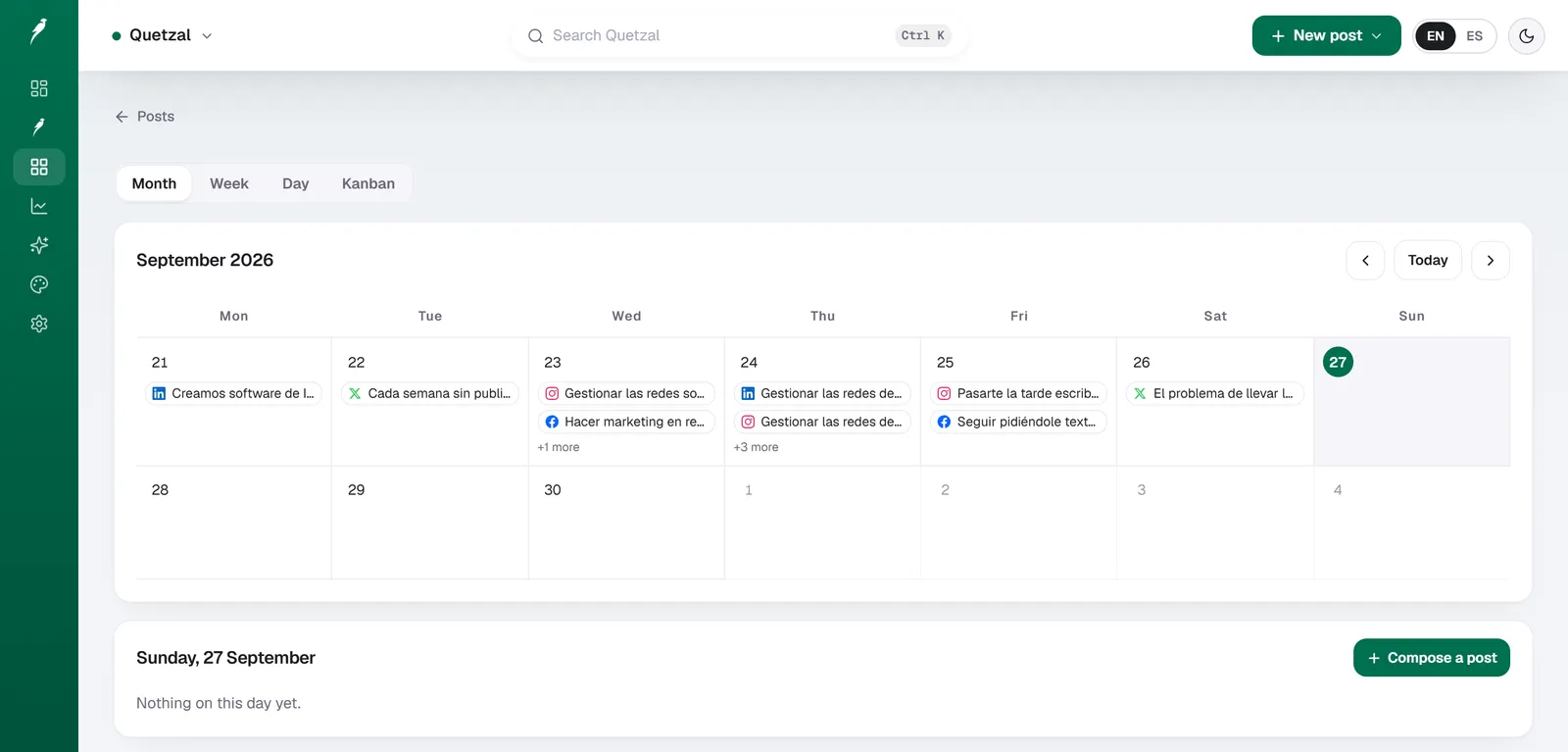
The Quetzal calendar on our own account in September 2026: every post the autopilot planned for LinkedIn, X, Instagram and Facebook, and underneath, the posts still waiting for approval. Our account publishes in Spanish.
Quetzal: AI social media autopilot
Quetzal is an AI social media autopilot built in Málaga, Spain, by two founders.
What it does that traditional schedulers do not is handle the actual creative production: it generates designed static posts, ads, carousels, infographics, stories, captions, and end-to-end AI video reels (complete with script, voiceover, word-synced captions, and rendered video) in the brand's own visual identity using its logo, palette, fonts, and product photos.
It schedules and publishes directly to Instagram, Facebook, LinkedIn, TikTok, X, and YouTube, then measures every post at 1, 6, 24, and 72 hours to improve the next week's content.
It fits businesses and marketing agencies in Spain, the rest of Europe, and the United States that want either full autonomy under standing brand guidelines or per-post approval control without the manual design workload.
Pricing starts at 79 EUR per month billed annually (89 USD per month in the United States) on the Starter tier, with a 7-day free trial, card required, nothing charged today.
As an honest drawback, it is a young product focused strictly on autonomous content generation and publishing rather than CRM lead routing or enterprise social listening streams.
Core operational differences between Zoho Social and Buffer
The fundamental difference between Zoho Social and Buffer lies in architecture and intent.
Buffer is built around the queue. You connect your social profiles, set recurring posting slots for each day of the week, and fill those slots with text, links, and media.
The platform stays deliberately uncluttered. Its navigation centers on a publishing calendar, a draft repository, a basic engagement inbox, and clean post analytics.
It does not attempt to be an all-in-one marketing suite. It integrates with external tools through webhooks and Zapier, but it maintains a modular identity.
Zoho Social is built around the console. It adopts a multi-column dashboard model reminiscent of classic command-center tools. In addition to a scheduling calendar, Zoho Social provides dedicated tabs for live brand mentions, keyword search streams, direct messaging conversations, and detailed lead attribution.
Because Zoho Social belongs to the broader Zoho ecosystem, it connects natively to Zoho CRM and Zoho Desk.
A social media manager using Zoho Social can view a user commenting on an X post or LinkedIn update, check whether that user exists as a contact in their CRM, view open support tickets, and push that social interaction to a sales representative as a new lead with two clicks.
If your team does not use Zoho CRM or does not treat social platforms as customer support touchpoints, those capabilities add visual density without providing utility. In that scenario, Buffer's minimalist environment is often faster to navigate.
But for sales-driven business-to-business organizations and customer-service teams, Zoho Social's conversational context provides operational depth that Buffer does not attempt to match.
Pricing models: per-channel billing versus bundled brand tiers
The two tools calculate their subscription costs using completely different metrics. Understanding the math behind your specific account configuration is critical to avoiding unexpected expenses.
How Buffer structures pricing
Buffer calculates its cost strictly per connected channel. A channel is defined as an individual social account (for example, one Instagram business profile, one LinkedIn company page, or one TikTok profile).
According to published Buffer pricing, the platform offers four primary tiers:
- Free: $0 per month. Allows up to 3 channels with a limit of 10 scheduled posts per channel at any given time. It includes basic publishing tools and a landing page builder, but lacks team seats and advanced analytics.
- Essentials: $6 per month per channel ($5 per month per channel when billed annually). This tier unlocks detailed analytics, post engagement tools, and unlimited scheduled posts.
- Team: $12 per month per channel ($10 per month per channel when billed annually). This plan adds unlimited team members, drafting collaboration, and approval workflows.
- Agency: $120 per month for the first 10 channels ($100 per month billed annually), with additional channels costing $6 per month ($5 billed annually). It includes custom access permissions and agency-specific client reporting.
Buffer's model is cost-effective for solo creators or businesses managing only two or three profiles. A small business posting exclusively to one LinkedIn page and one Instagram profile pays $10 to $12 per month on Essentials.
However, if your organization manages multiple brands across six networks each, the per-channel model scales rapidly. Managing five distinct client brands across five networks each equates to 25 channels, resulting in a minimum monthly spend of $250 to $300 on the Team plan.
How Zoho Social structures pricing
Zoho Social prices by the "Brand." A brand in Zoho Social is a bundled set of social channels containing one profile per supported network (one Facebook Page, one X profile, one Instagram business account, one LinkedIn company page, one YouTube channel, one Pinterest account, and one TikTok account).
Rather than charging for each individual network, Zoho Social charges a flat fee for the brand bundle:
- Standard: Typically starts around $15 to $20 per month (billed annually) for 1 brand and up to 10 channels within that brand bundle, limited to a single user.
- Professional: Typically priced around $35 to $40 per month (billed annually) for 1 brand, adding the Live Stream monitoring dashboard, custom reporting, SmartQ publishing predictions, and Zoho CRM integrations. Additional team members can be purchased as add-ons.
- Agency and Agency Plus: Priced higher to accommodate multiple brands (often starting at 10 or 25 brands) with dedicated client portals, white-label reporting, and multi-user administration.
| Metric | Quetzal | Buffer (2026) | Zoho Social (2026) |
|---|---|---|---|
| Pricing basis | Tiered subscription | Per channel (per social profile) | Per brand bundle (group of channels) |
| Free tier | 7-day free trial (card required, nothing charged today) | Yes (up to 3 channels, 10 queued posts) | Limited free edition or trial |
| Lowest paid tier | 79 EUR/mo (89 USD/mo billed annually) | $6/mo per channel ($5/mo billed annually) | ~$15 to $20/mo per brand bundle |
| Team collaboration cost | n/a | Included on Team plan ($12/ch/mo) | Included on higher tiers or per-seat add-on |
| Supported networks | IG, FB, LinkedIn, TikTok, X, YouTube | IG, FB, X, LinkedIn, TikTok, YouTube, Pinterest, Mastodon, Threads, Bluesky | IG, FB, X, LinkedIn, YouTube, Pinterest, TikTok |
| Primary focus | AI content generation, publishing, and measurement | Queue-based scheduling and clean analytics | Social monitoring, CRM integration, scheduling |
Source: Buffer pricing, 2026, alongside standard Zoho Social tier structures.
If you run a single business that maintains accounts across six different social networks, Zoho Social's Professional tier is often more economical than Buffer's Team plan. Conversely, if you only manage two accounts and do not need enterprise collaboration, Buffer's Essentials tier provides a lower absolute entry price.
Content publishing and scheduling workflows
Both tools handle modern publishing requirements, including direct Instagram reel publishing, TikTok scheduling, carousel posting, and first-comment automation. Yet the day-to-day composition experience feels distinct.
The Buffer publishing workflow
Buffer's publishing flow emphasizes speed and clean layout. When you open the composer, you can draft a universal message and then toggle platform-specific tabs to tailor character counts, hashtags, and mentions for each network.
Key workflow features in Buffer include:
- The Queue: You set a timetable (for example, every weekday at 9:00 AM and 2:30 PM). Every post added to your queue automatically slots into the next available window without requiring manual calendar selection.
- Browser Extension: Buffer maintains an efficient browser extension that lets you share articles, images, or snippets directly from any web page into your queue.
- Start Page: A built-in, mobile-responsive landing page builder (similar to Linktree) that links out to your prioritized content.
- Emerging Network Support: Buffer adapts quickly to decentralized and emerging platforms, offering early scheduling support for networks like Threads, Mastodon, and Bluesky alongside traditional channels.
For businesses that prefer alternatives to legacy platforms, exploring a Metricool alternative guide or our breakdown of Buffer alternatives highlights how queue mechanics simplify daily publishing compared to complex multi-pane tools.
The Zoho Social publishing workflow
Zoho Social approaches composition through a more comprehensive project management interface. While it supports basic queue scheduling, its composition dashboard emphasizes timing optimization and cross-departmental awareness.
Key workflow features in Zoho Social include:
- SmartQ Predictions: Zoho Social analyzes historical audience engagement data to suggest specific publishing times for each network. While Buffer offers basic timing recommendations, SmartQ visualizes expected engagement percentages across different hours of the day directly in the composer.
- Pause Publishing: A central emergency button allows teams to instantly pause all scheduled outbound content across every brand and channel with a single click during a PR crisis or major news event.
- Approval Dashboards: Zoho Social provides granular permissions where junior copywriters can draft content, managers can review and leave inline edit notes, and designated administrators provide final authorization before posts are queued.
- Discussion Tabs: Team members can create internal discussion threads around specific campaigns or posts inside the platform before scheduling them.
If your team consists of a solo marketer, Zoho Social's multi-step confirmation screens and permission architecture can feel encumbered. For distributed marketing departments with compliance rules, however, those checks prevent unauthorized posts from going live.
Social listening, monitoring, and CRM connectivity
The widest operational gap between Buffer and Zoho Social appears after content is published.
Buffer treats engagement as an inbox workflow. On supported plans, its "Engagement" tab aggregates comments across your Instagram and Facebook business pages.
You can reply to comments, mark them as reviewed, and assign hotkeys to process interactions quickly. However, Buffer does not offer comprehensive listening for brand keywords, competitor tracking, or hashtag monitoring outside your direct profile mentions.
Zoho Social, by comparison, provides a complete social listening engine built directly into its interface:
[ Incoming Social Activity ]
             │
             ▼
   [ Zoho Social Monitor ]
   ├── Live Stream: Mentions, replies, shares
   └── Custom Columns: Competitor keywords, hashtags
             │
             ▼
   [ Direct Business Action ]
   ├── Resolve as Support Ticket (Zoho Desk)
   └── Convert to Qualified Lead (Zoho CRM)
Within Zoho Social's "Monitor" tab, users can configure custom columns tracking:
- Brand mentions without direct profile tagging.
- Industry-specific keywords or purchasing-intent phrases.
- Competitor profile updates and consumer sentiment.
- Specific user lists (such as existing enterprise accounts or media contacts).
When an interaction occurs, a team member can click on the user's profile card to review their social interaction history.
If the inquiry indicates an intent to purchase, the social media manager can push that profile into Zoho CRM as a new lead, complete with interaction history and lead scoring notes. If the post is a complaint, it can be routed directly into Zoho Desk as a priority support ticket.
If your marketing strategy relies on converting social engagement into measurable enterprise revenue pipelines, Buffer cannot fulfill this requirement natively. You would need third-party automation tools to pass data from social networks into your CRM.
Zoho Social provides this pipeline out of the box, positioning it closer to enterprise tools reviewed in our Sprout Social alternative free guide.
Analytics, reporting, and team collaboration
Reporting needs vary significantly depending on whether you report to an internal executive, review numbers for your own personal brand, or deliver monthly client deliverables as an agency.
Buffer's analytical approach
Buffer provides clean, intuitive post- and profile-level analytics on its Essentials, Team, and Agency tiers.
Its reporting dashboard highlights:
- High-level metric overviews: total impressions, engagement rate, follower growth, and click counts.
- Best-performing post types: breakdowns by post format (images, carousels, text, videos) to identify what content resonates best with your audience.
- Export options: clean PDF exports and CSV data downloads that require little customization to understand.
Buffer's analytics are designed for quick interpretation. They are ideal for growth marketers and solo operators who need to identify winning formats and adjust content strategies without spending hours building custom formulas.
Zoho Social's analytical approach
Zoho Social treats reporting with the depth expected of enterprise analytics software.
Its analytical capabilities include:
- Custom Report Builder: Users can construct custom drag-and-drop reports combining cross-channel metrics, network-specific demographics, and audience distribution data.
- Scheduled Automated Reports: Reports can be scheduled to automatically generate and email directly to executives or clients as branded PDFs on weekly or monthly cycles.
- Team Performance Audits: Zoho Social tracks internal response times, logging how quickly individual team members reply to inbound messages and resolve social conversations.
- Client Portals: Agencies can provide clients with dedicated portal access, allowing them to view real-time performance reports and approve drafted content without accessing internal team settings.
For enterprise compliance and formal agency presentations, Zoho Social's depth provides an advantage over Buffer's standardized reporting templates.
The structural limitation: distribution versus content generation
While Zoho Social and Buffer compete aggressively across scheduling, monitoring, and reporting, they share a major structural limitation common to traditional social media management platforms: neither tool creates the content you post.
Both platforms are distribution engines. They assume that your marketing team arrives with:
- Professionally designed visual assets (carousels, static infographics, stories, banners).
- Video reels shot, edited, and synchronized with accurate captions.
- Written copy tailored to the unique demographic voice of each network.
- Cohesive brand styling (brand typography, hex color codes, and visual identities).
In a traditional agency or in-house setup, this requires maintaining separate graphic design subscriptions, video editing software, and copy drafts, followed by manual asset exporting and uploading into Buffer or Zoho Social.
Teams seeking to automate generation often look into platforms covered in our Predis.ai alternative analysis, where artificial intelligence attempts to bridge asset creation and post distribution.
This operational bottleneck is why we built Quetzal in Málaga, Spain. Rather than acting purely as an empty calendar queue, Quetzal operates as an AI social media autopilot.
Instead of requiring you to design posts in external tools and manually upload them to a scheduling interface, Quetzal generates designed static posts, ads, carousels, infographics, stories, and captions directly in your brand's visual identity using your logo, palette, fonts, and product photography.
Furthermore, Quetzal produces complete AI video reels from end to end: generating the script, recording the AI voiceover, adding word-synced animated captions, and rendering the finished video for direct publishing to Instagram, Facebook, LinkedIn, TikTok, X, and YouTube.
Quetzal measures every post at 1, 6, 24, and 72 hours, using performance data to adapt and improve the next week's content autonomously. Teams can run Quetzal in full autopilot mode under standing brand guidelines or retain final per-post approval.
Pricing starts at 79 EUR per month billed annually (89 USD per month in the United States) on the Starter tier, scaling up to Growth (199 EUR / 229 USD), Pro (449 EUR / 499 USD), and Ultra (899 EUR / 999 USD per month).
For teams that want to eliminate the design-and-upload bottleneck entirely, an autopilot model replaces the manual assembly line required by tools like Buffer and Zoho Social.
Feature comparison at a glance
To help determine which tool aligns with your internal resources and operational priorities, review this direct capability breakdown:
| Capability | Quetzal | Buffer | Zoho Social |
|---|---|---|---|
| Primary Interface | Autopilot / approval dashboard | Lightweight queue & calendar | Multi-column command console |
| CRM Integration | n/a | None native (requires webhooks/Zapier) | Deep native sync with Zoho CRM |
| Social Listening | n/a | Direct profile interactions only | Keyword streams, hashtags, competitor monitoring |
| Approval Workflows | Autonomous autopilot or per-post approval | Available on Team and Agency plans | Granular permissions on Pro & Agency plans |
| Emerging Networks | n/a | Fast adoption (Threads, Mastodon, Bluesky) | Core standard networks |
| Crisis Controls | n/a | Manual post deletion/rescheduling | One-click global "Pause Publishing" button |
| Content Generation | Posts, carousels, infographics, stories, captions, and AI video reels | Basic text drafting assistant | Basic text drafting assistant |
| Target User | Businesses and agencies in Spain, Europe, and the US | Creators, boutiques, lean marketing teams | Mid-market businesses, CRM users, social teams |
Verdict: which tool should you choose in 2026?
Choose Quetzal if:
- You want a system that generates designed posts, carousels, captions, and AI video reels in your brand identity rather than just scheduling files you create manually.
- You need content published across six networks (Instagram, Facebook, LinkedIn, TikTok, X, and YouTube) with performance tracking at 1, 6, 24, and 72 hours to guide future output.
- You want the flexibility of full autopilot under standing brand guidelines or manual per-post approval.
- You are a business or agency in Spain, Europe, or the United States looking for entry pricing starting at 79 EUR (89 USD) per month with a 7-day free trial.
Choose Buffer if:
- You operate as an independent creator, consultant, or compact marketing team focused on fast execution.
- Your primary requirement is an intuitive, reliable queue for cross-posting content to social channels.
- You maintain only two to four social profiles and want to keep software expenses low using per-channel billing.
- You prioritize scheduling to newer platforms like Threads, Mastodon, and Bluesky alongside legacy networks.
- You do not require advanced social listening, keyword tracking, or CRM lead attribution.
Choose Zoho Social if:
- Your organization already runs its sales or service operations on Zoho CRM, Zoho Desk, or the Zoho One ecosystem.
- You treat social media channels as active customer acquisition and service touchpoints that require lead conversion tracking.
- You manage complete brand bundles across five or more major networks, making bundled brand pricing more affordable than per-channel billing.
- You require enterprise governance, such as granular multi-tier draft approval processes and one-click global publishing pauses.
- You need deep social listening streams to monitor brand sentiment, competitor accounts, and industry keywords in real time.
Automate your social media workflow
If manual content production slows down your marketing, Quetzal replaces the traditional assembly line of external design tools, copy drafts, and video editors. It creates on-brand static graphics, carousels, stories, and complete AI video reels using your exact palette and typography.
It publishes across six major networks and measures engagement at 1, 6, 24, and 72 hours so each week performs better than the last, all while giving you the option of full autopilot or per-post review.
To see a full week of branded posts produced for your business in about 3 minutes without signing up, try it free on your own website.
FAQ
Does Zoho Social have a completely free plan like Buffer?
Buffer provides a permanent free plan that permits up to 3 connected channels with a limit of 10 scheduled posts per queue. Zoho Social occasionally provides limited free editions with minimal functionality, but its primary access model relies on a 15-day free trial followed by paid brand-tier plans.
For users requiring a permanent zero-cost scheduling tool for a few profiles, Buffer is the more accessible option.
Can Zoho Social publish directly to Instagram and TikTok without mobile notifications?
Yes. Both Zoho Social and Buffer support direct API publishing to Instagram Business profiles and TikTok accounts for single images, carousels, and video reels. Neither tool requires manual mobile push notifications for standard post formats, provided your social accounts are configured as professional or business profiles under platform guidelines.
Can I connect multiple LinkedIn company pages to a single Zoho Social brand?
In Zoho Social, a standard "Brand" bundle allows for one profile per network (one personal LinkedIn profile or one LinkedIn company page). If your business operates multiple regional LinkedIn company pages under the same corporate umbrella, you must purchase additional brand bundles or channel add-ons.
In Buffer, you can connect multiple LinkedIn company pages side by side simply by paying the per-channel subscription fee for each page.
Which platform is better suited for marketing agencies?
The choice depends on your agency's operating model. Buffer's Agency plan is ideal for lean agencies that want a clean, minimalist interface to manage publishing and approvals across multiple client accounts without steep training curves.
Zoho Social's Agency and Agency Plus plans are better for full-service digital agencies that need custom-branded client portals, multi-tier compliance approvals, white-label client PDF reporting, and integrated customer support workflows.
Sources
- Buffer pricing: https://buffer.com/pricing